

September 2026


Contents
- Isaac’s Essentials The Cost of Staying in Business
- Lessons from an SME Your Support Process Has Changed
- Just Ask Goldie Episode 1 — And Take A Listen To What He Has To Say
- Goldie AI is Doing More Than Answering Questions CheckMate & Goldie Plus
- Be First: The NextGen Early Adopter Program Put data power back in your hands
- Supported Environments Update Microsoft SQL Server & Windows Server
- Spotlight Sabrena Maloney
- Software Tips Collection-Master
- Software Tips Q-LawE
- Software Tips vExchange Analytics
- Latest VT Happenings Conferences / Mastermind / More...
- ICYMI In Case You Missed It
- vTrivia Enter to Win
Isaac’s Essentials
The Cost of Staying in Business

There’s a deli a few minutes from our office that I’ve been going to for years. I get the same smoothie almost every morning – same order, same guy behind the counter who starts making my order sometimes before I’ve even reached the register. A little while back I noticed the prices on the board had crept up. Not by much, but enough to catch my eye. When I said something, the owner just shrugged. “Isaac, everything I buy has gone up – the fruit, the rent, insurance, the kid I pay to run the register. I held out as long as I could.”
I’ve thought about that conversation more than once, because it’s the same one I keep having in my own head about Vertican.
If you run a firm, you already know exactly what he meant. You’ve opened the renewal notices. You’ve watched line items you barely used to think about turn into numbers you now have to plan around. The cost of simply staying open – of keeping good people, keeping the lights on, and keeping everything up to code – has been climbing at a pace that is, frankly, hard to manage in an environment where so little of it is in your control.
I want to pull back the curtain a little on what that looks like on our side, because I think you’ll recognize it.
What actually goes up
Some of our rising costs are the ordinary ones every business carries: health insurance for our team, rent, utilities, and the steady investment it takes to keep our facilities, systems, and certifications current and compliant. Those matter, and they add up.
But the ones that have genuinely surprised us are the tools and services it now takes to run a secure, compliant technology company in a regulated industry. Security and compliance monitoring platforms like Vanta. Our IT and cybersecurity stack. The specialized insurance coverage a company like ours must carry. Our dues to the industry organizations that keep us plugged into where this business is headed. Individually, none of these is glamorous. Together, they’re the price of being a partner you can trust with your data.
And here’s the part that’s hard to believe until you see the invoices side by side: some of these didn’t just creep up – they jumped. We’ve watched renewals come back at ten and twelve times what we were paying, and in a handful of cases, north of a hundred times.
There’s a straightforward way to think about it. The subscriptions and platforms we pay for are, to us, what Collection-Master, Q-LawE, vMedia, NextGen, and CheckMate are to you – the tools that make the work possible, keep us secure, maintain data with integrity, and keep us competitive. When their costs rise, ours do too. On top of that, the applications our developers use to build software, and the AI platforms now woven through our products, went up significantly this past year alone. And great engineers – the developers and contractors who actually build what you use every day – have never been more in demand, or more expensive to keep.
How we handle it
I’ll be honest with you: we don’t pass all of it along. We absorb as much as we responsibly can, because a price you can’t plan for isn’t a partnership – it’s a problem. When an increase does reach you, it’s because we’ve already carried what we could and the math has simply caught up with us.
The reason we can do that at all comes down to something my father, Stevan Goldman, wrote about long before “SaaS” was a word anyone used. He believed you never stop reinvesting in your own business – and that a healthy company sets aside roughly ten percent of its budget to maintain what it has, anticipate the increases coming down the road, and invest in what’s next. Hardware, software, people. That discipline is how a company stays standing when the ground keeps shifting. And we still run by it.
Where the money goes
Which brings me to the part where I’m especially proud: when we reinvest, you can see where it lands.
It lands in NextGen, the API platform that lets you move and broker your own data across systems without the cost and pain of conversions. It lands in the Goldie AI Platform – from Ask Goldie answering your team’s questions in seconds, to Goldie Plus, which includes the custom AI support agent, and its automation suite, where CheckMate turns garnishment, consumer debt settlement, and attorney checks into ready-to-post files, and the Mailroom and Redaction tools slash excessive time spent in repetitive, clerical tasks. It lands in vExchange, still the standard for moving placement data across our industry, and in the platforms so many of you have built your firms around for decades.
But reinvestment isn’t only about growth – it’s also how we sustain. A company that stops earning stops innovating and eventually stops being here at all. Staying in business for more than forty years isn’t something we take for granted; it’s something we’ve worked hard to earn, and something we intend to keep earning for a long time to come. So no, we are not standing still, and we’re not spending your dollars on keeping the lights the same shade as they were ten years ago. We’re investing in continuing to be the kind of company you want to be working with in ten more.
The quiet part
One of our core values around here is “Be a Duck” – calm and composed on the surface, paddling hard underneath. Managing costs in a climate like this one is a lot of paddling you never see. My commitment to you is that we’ll keep doing it the right way: absorbing what we can, being transparent about what we can’t, and making sure that every dollar we do have to ask for goes toward making your business better.
The deli owner was right. Everything went up. But the good places are still worth every penny, because you know exactly what you’re getting when you walk in the door.
I intend for Vertican to always be one of those places.
Your Support Process Has Changed!
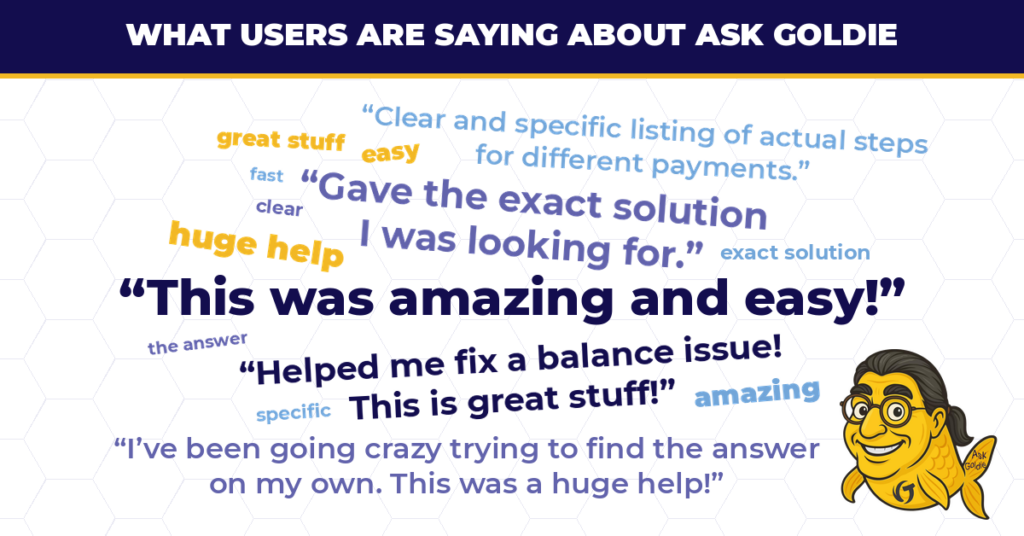
As of August 1, 2026, Ask Goldie is the required first point of contact for support across all Vertican subscription products. If your firm activated over the summer — you’re set. Goldie is already working for you.
Another important date to keep in mind is October 1. Beginning on the first, when you give a  thumbs down, you will be directed to order Professional Services on the vStore for further assistance.
If your firm hasn’t completed implementation yet, now is the time to close that gap. Support across your Vertican platforms is designed to start with Ask Goldie, and finishing setup keeps your team on the fastest path to answers.
Ask Goldie was built to solve one of the most common frustrations users face with complex software: finding a quick answer. Instead of submitting a request and waiting, your team gets:
- Immediate answers, 24/7 — no waiting for a response
- Faster resolution across your Vertican platforms
- Access to VT Client Success knowledge resources, trained on Vertican documentation
- A searchable chat dashboard, so prior queries and answers stay at your fingertips
And the agent itself is included for all subscription clients and offers unlimited conversations and no usage caps.
Not set up yet?
- Getting started is quick — firms are up and running in a single session. To schedule a concierge onboard session, purchase an hour of Professional Services Consulting, enter #020-CMQL, and a vPro will reach out to you.
“Ease of use. Very informative. Sabrena is awesome. Very knowledgeable and incredibly patient.” – Ask Goldie Concierge Service user
- If you prefer to move at your own pace, the Ask Goldie User Guide walks your team through self-service activation and first use step by step.
Already using Ask Goldie? Get more out of it.
A few small habits make a noticeable difference:
- Bookmark your login page so access is one click away
- Use the Prompt Guide — better questions get better answers, and the guide shows your team how to phrase requests for the fastest, most specific results
- Check your chat history before re-asking; your dashboard keeps a record of what Goldie has already answered
Your feedback shapes what comes next
Every thumbs up and thumbs down you leave in Ask Goldie goes directly toward making it sharper — and getting you better answers. When an answer is a miss, tell us why: those notes tell our team exactly which documentation and which workflows need improvement. And Goldie isn’t standing still —our AI-powered support agents have evolved beyond answering complex questions about Vertican products, and can now execute tasks for you! This starts with Goldie Plus automation tools like CheckMate, Mailroom, and Redaction tools.
Learn More
Looking to get more out of a tool your team already uses? Reach out to your Account Manager. Our Account Management team can review where your firm stands and what setup you still need.
Goldie has something to say!
Ask Goldie has been answering your questions since August — now Goldie is officially introducing itself. This is a sneak peek at Episode 1 of our new short-form video series coming soon to give your team bite-sized tips for getting faster answers out of Goldie, trained on Vertican’s documentation and able to deliver immediate answers, 24/7, across all your software products!
In 45 seconds, Goldie covers:
- What it’s trained on, and why that matters for the answers you need
- Three helpful prompting tips
- How your thumbs up/thumbs down ratings make future answers better
Watch the episode below, sign in, and put Goldie to work for you.
That’s A Wrap!
Our Goldie Rewards program has officially concluded. Thank you to every client who asked a question, left feedback, and helped us tune up the Ask Goldie support agent.
Here’s what participation actually looked like: ask a question you already needed answered. Leave a thumbs up or thumbs down. That’s it — you were entered. No forms, no extra steps, no separate submission process. Each month, we drew five winners at random, who received a $200 gift card, and we published the results right here in vConnect.
That feedback did real work. Every thumbs up and thumbs down told us where the agent was strong and where it needed to improve, and that input shaped the tool your team uses today.
Goldie Rewards is closed, but Ask Goldie isn’t going anywhere – and neither is our habit of rewarding the clients who show up. Keep an eye on vConnect. When the next opportunity comes around, the firms already set up and actively using their tools will be the ones positioned to take advantage of it.
Announcing Our August Winners!
The Undeniable Case for Automating Check Processing
Check processing is one of the most common pain points we hear about from clients. Teams know that accurate, timely payment posting is essential to cash flow, client trust, and compliance – yet the work behind it is stubbornly manual. Checks arrive in inconsistent formats, with incomplete data and small variations in names or account details that make confident matching difficult. The result is a steady stream of repetitive work handed to your team or an outside vendor, and at scale that “manual by default” approach becomes expensive, slow, and fragile. Our research shows that processing just 5,000 transactions a month can exceed $8,000 in human capital costs alone – before accounting for misapplied payments, rework, and compliance exposure.
CheckMate, part of the Goldie Automation Suite, changes the equation. Our proprietary AI reads scanned checks and extracts the key data from each image, high-confidence matches are assigned to the right account, and an AutoPost file is generated for secure transfer into your collection software. Exceptions are routed to a review queue, so your team’s attention goes only where it’s truly needed. Clients already using CheckMate report same-day processing instead of multi-day backlogs, thousands of dollars saved each month, hundreds of hours returned to their teams, and dramatically lower error rates – and it integrates with your existing systems whether or not you run Vertican software. The real lesson from these firms isn’t just speed. It’s control: a standardized, auditable process that scales without adding cost or risk. Read More!
Goldie Plus: From Answering Questions to Getting Work Done
Since Ask Goldie launched to all clients in November 2025, you’ve been able to get quick “how to” answers about your Vertican software without digging through documentation. Now Goldie has evolved from a support resource into a platform that actively completes work for your firm. Goldie Plus, our premium AI offering, brings together two capabilities. The first is a Goldie Custom Agent – a private instance of Ask Goldie built on your firm’s own SOPs and client manuals alongside Vertican documentation, so it answers based on your specific processes and customizations, and it’s available to your staff 24/7. The second is the Goldie Automation Suite: CheckMate for payment posting; Goldie Mailroom, which classifies and separates incoming documents, matches them to the correct account, and maps extracted data to the right fields in your system; and Redaction, which analyzes documents in bulk and redacts sensitive information based on your custom rules for each client and jurisdiction.
All of it is built with data privacy, enterprise security, and compliance at the core. Client data is never used to train public models, access is tightly controlled and encrypted, and auditability is built in so you can see how data is handled and decisions are made. The firms adopting Goldie AI today are building a real operational advantage for tomorrow. Read More!
Put data power in your hands
For a limited time, we’re inviting a select group of firms to join the NextGen Early Adopter Program. If your data lives on an on-premise server, working with it means being where the server is. NextGen changes that. Our secure, API-driven platform replicates your local data in the cloud and keeps it synchronized in real time — so you can read, update, and move your data from wherever you are. No migration. No data conversions. Your existing system stays right where it is.
Early adopters get three things:
- Early access to the NextGen API — built on the industry-standard OpenAPI Specification, with real-time two-way syncing between your current Vertican system and the cloud.
- A first look at VT Connect — our new web-based workspace for reviewing collection claims and account data from your NextGen cloud backend. It’s under active development, so what you’ll see is mock data and is subject to change.
- A direct line to our product team — your feedback shapes the roadmap.

Getting in is simple. You’re a Collection-Master firm on the latest version, with a test system running SQL-Sync. That’s it; we’ll handle onboarding from there. Participation is free during the UAT (User Acceptance Testing) period.
As for security, it isn’t a feature of NextGen – it’s the architecture. All API access requires a valid Microsoft Entra ID token, all traffic is encrypted via TLS, and your data is fully isolated from every other client’s. Everything is hosted on Microsoft Azure and built to Vertican’s standard: Data with Integrity.
Spots are limited, so you’ll receive personalized attention throughout the process. Let’s get started!
Editor’s Note: We recently held a Mastermind session where Nicholas Arcaro, SVP of Business Development, provided a full overview of the platform and and the UAT program – take a look at the video recording.
Supported Environments Update
Vertican has updated its recommended and supported environments for Microsoft SQL Server and Microsoft Windows Server. Below is a summary of what changed, the reasoning behind our approach, and the assistance available if your firm needs to plan a migration.
Our approach to Microsoft versions
Newest Versions
Clients occasionally ask why Vertican doesn’t support the newest Microsoft release the moment it ships. The answer is simple: we prioritize stability over novelty. New Microsoft releases frequently arrive with bugs, changed behaviors, and driver compatibility issues. Our policy is to support one version behind the latest release, which gives Microsoft time to resolve early issues and gives us time to validate the platform thoroughly once real-world adoption is sufficient. For a business that depends on stability, the newest version is rarely the safest choice.
End of Life
On the other end of the lifecycle, Vertican aligns with Microsoft’s official support timelines. Once Microsoft ends support for a product, security patches and bug fixes stop, leaving your environment more exposed. Older versions can also create friction with Vertican software — driver conflicts, SQL commands that fail, and new features that don’t behave as expected — even if you haven’t changed anything on your end.
To be clear: nothing prevents your firm from running the latest Microsoft platform, and it may work perfectly well with Vertican software. But functional is not the same as officially supported. Until a version has been validated and widely adopted, it falls outside our supported environments — a distinction that matters most at the moment something goes wrong.
SQL Server Changes
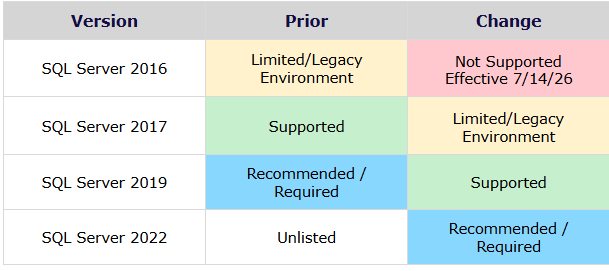
- SQL Server 2022 is now Recommended/Required.
- SQL Server 2019 moves from Recommended/Required to Supported.
- SQL Server 2017 moves from Supported to Limited/Legacy Environment; Microsoft has set its final end of life for October 12, 2027.
- SQL Server 2016 is no longer supported, effective July 14, 2026, matching Microsoft’s final end-of-life date. Firms still running SQL Server 2016 should plan a migration to a newer version as soon as possible.
Windows Server Changes
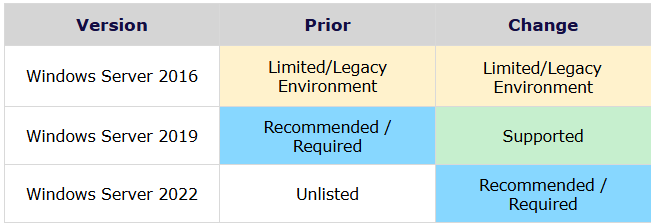
- Windows Server 2022 is now Recommended/Required.
- Windows Server 2019 moves from Recommended/Required to Supported.
- Windows Server 2016 remains a Limited/Legacy Environment until January 12, 2027, when Microsoft’s extended support ends. Firms running Windows Server 2016 should migrate to a newer version before the end of this year.
Support Category Definitions

Vertican System Requirements use four categories that mirror Microsoft’s support lifecycle: Recommended/Required, Supported, Limited/Legacy Environment (Upgrade Recommended), and Not Supported/Not Recommended.
If your firm operates in a Limited/Legacy or unsupported environment, any support from Vertican will require Professional Services. Supported environments may also necessitate Professional Services in certain cases — complex upgrades, migrations, integrations, performance reviews, or environment-specific troubleshooting.
Planning Your Migration
Vertican Professional Services (vPros) has the expertise to help you optimize your environment for Vertican software and reduce the risks that come with running unsupported environments. A vPro consultant can review your current setup, define the scope of work, and build a project plan around your firm’s timeline.
If you need advice on how to make use of vPros, reach out to your Account Manager at AccountManagement@Vertican.com. We also offer set vPro Service Packages, including vMedia Migration Assistance for upgrading an existing vMedia SQL Server, and Q-LawE System Performance Optimization to review your SQL Server settings and Windows Registry configuration.
Spotlight
Sabrena Maloney

What is your title and when did you begin working at VT? I am a Client Success Representative, and I joined Vertican in March 2026. Since then, my role has grown quite a bit! I’ve become the SME for Ask Goldie and CheckMate, and I’ve also been helping support vExchange. Beginning September 15, 2026, I will be transitioning into the Collection-Master Support team.
What sort of work did you do before joining Vertican? Before joining Vertican, I spent nearly 25 years with Texas Instruments as a Process Engineering Technician. I retired from TI in February 2026 after a long career there. Apparently, retirement and I were not meant to be, because less than a month later I was starting an entirely new adventure with Vertican.
What is a typical day at Vertican like for you? I am not sure there really is such a thing as a typical day at Vertican, and honestly, that’s one of the things I love most about it. Some days are filled with client meetings, helping them get Ask Goldie set up, and teaching them how to use our newest support tools. Other days are all about troubleshooting, digging into issues, and helping clients solve concerns across the different products I support.
What do you like most about working for Vertican? What I like most about working for Vertican is honestly the people. I work with a great group of coworkers, and even though we’re remote, there’s still a real sense of teamwork and connection. I also love the flexibility of working from home, but probably my favorite part of the actual job is troubleshooting. I enjoy digging into a problem, figuring out what’s going wrong, and being able to help a client get past whatever has them stuck. There’s something really satisfying about turning an “I have no idea what’s happening” moment into an “Okay, we fixed it!” moment.
 What was your very first job and how old were you? This one is definitely going to date me! I got my first job delivering newspapers when I was about 10 years old. From there, I graduated into the neighborhood babysitting business, and apparently, I was running a premium service before I even knew what that meant. I didn’t just keep the kids alive and entertained, I also did dishes, straightened up, swept, mopped, and tackled whatever else I could while I was there. Needless to say, the moms loved me and I stayed pretty busy. My first “official” job with an actual paper paycheck was at McDonald’s when I was 16.

If you could learn anything new, what would it be? If I could learn anything new, I think I’d love to really learn the craft of writing and publishing a book. I’ve always had stories and ideas bouncing around in my head, and I’d love to know how to take them from “this is a fun idea” all the way to a finished book that other people could actually read. I think it would be equal parts challenging, creative, and incredibly rewarding.
Word on the street is you ride a motorcycle? Tell us about it and how that began. That love started a long time ago when my dad first put me on the back of one of his. I was fascinated from the beginning and always assumed I’d have my own bike much sooner than I did. Then life happened, motherhood came first, and I decided being a responsible parent probably outranked my motorcycle dreams for a while. Once my kids were nearly grown and definitely old enough to fend for themselves, I finally decided it was time. About 13 years ago, I asked my husband for a “let’s do something together” birthday date and chose motorcycle riding lessons. We both got completely hooked and ended up getting his-and-hers Harleys.
Since then, I’ve ridden all over the country, met some incredible people, and made memories I never could have imagined back when I was that little girl riding behind my dad. I absolutely love it. There’s nothing quite like throwing on my helmet, gearing up, putting my knees to the breeze (Breeze is also my road name), and getting a little wind therapy.
What (else) do you like to do outside of work? Outside of work, I’m usually doing something creative, adventurous, or slightly chaotic. I love crocheting, writing, working on little projects around the house, traveling whenever I get the chance, and spending time with my family and friends. I’m also a gamer, a bit of a crafter, and I usually have at least one new idea or project bouncing around in my head. I really enjoy anything that lets me create, explore, learn something new, or make a memory. I’m not very good at sitting still for too long, so there’s usually something going on.
What is something about you that may surprise your colleagues? I’m a little bit of a social media influencer. It all started years ago during my “Keto Queen” era, when I began sharing my journey, recipes, tips, successes, failures, and all the real-life chaos in between. Somewhere along the way, people actually started following along! What started as sharing one part of my life eventually grew into me sharing a little bit of everything, usually with plenty of humor and absolutely NO desire to pretend life is perfectly polished. I’ve always enjoyed connecting with people, making them laugh, and reminding them that it’s okay to just be yourself. That eventually became part of my own little #free2beBre philosophy.
Share something exciting you did in the last 12 months. One of the most exciting things I’ve done in the last 12 months was retiring after 25 years with the same company… although apparently, I wasn’t very good at retirement because it lasted less than a month before starting a whole new career! I guess you could say I cancelled my retirement subscription while I was still on the free trial. Making that kind of change after so many years was equal parts exciting and terrifying, but it turned out to be exactly the fresh start I needed. It pushed me out of my comfort zone, allowed me to learn about an entirely new industry, and reminded me that sometimes the next chapter starts a lot sooner than you planned.
Do you have a favorite movie, artist and/or book?
Movie: Practical Magic (and YES, I WILL be watching the sequel!)
TV: I love true crime stuff
Musical or Other Artists: Just about ALL music! Though I am partial to my 80’s upbeat pop music for cleaning the house!
Book or Author: Ransom by Julie Garwood.
Please share a favorite quote: “Life is too short to spend it becoming who everyone else thinks you should be. Be loud, be weird, be kind, be YOU!”
 Software Tip
Automating Email Notifications with Field Level Events
In today’s fast-paced world, timely communication is crucial. Field Level Events (FLEs) in Collection-Master offer the strategic option for email notification automation based on specific field updates or actions performed on a claim. These automated processes not only work to better facilitate coordination and communication, but also turn routine updates into actionable insights, all whilst ensuring essential information is communicated promptly.
What are Field Level Events?
FLEs are a dynamic feature within Collection-Master designed to automatically react to designated changes made in specific claim fields. Configured in the CUSTOM\EVENTS.INI file, FLEs monitor the claim for specified changes in supported tables such as MASTER, DEBTOR, EXTRA, and INFINITY. Upon detecting a change, Collection-Master can trigger actions like diary updates, document generation, tag modifications, and email notifications without manual intervention. If needed, reference the software tip Field Level Events: The Basics.
Triggering Emails with FLEs
FLEs provide a robust automation solution for email communications via defined parameters like ‘Email.Address’ and ‘Email.Type’. This configuration allows users to determine email recipients and the automation level, whether generating draft-ready messages or automated notifications. By leveraging template variables, claim-specific details can be seamlessly incorporated into each email, ensuring accuracy and personalization.
Email.Type Parameter Options:
- OPEN: Generate draft-ready emails for review and approval before sending. This option is ideal for critical communications that require assessment prior to sending.
- QUIET: Automate dispatch of standardised internal notifications, thereby minimizing workflow disruptions.
Such automations enhance operational efficiency, ensuring real-time communications are consistently delivered whenever key field updates occur, without the need for an additional manual task.
Use Cases and Advanced Configurations
FLEs cater to diverse operational needs, enabling instant communication and streamlined workflows:
-
Draft-Ready Emails: Suitable for scenarios requiring human judgment before sending, such as notifying attorneys about newly filed suits. Configuring the Email.Type to OPEN initiates draft emails when specified fields are updated, such as MASTER.DOCKET_NO. This combines automation with human oversight, ensuring communications remain accurate and compliant.
-
Auto-Send Emails: Optimize internal notifications for real-time updates, enhancing department responsiveness. Setting the Email.Type to QUIET enables immediate email dispatch upon certain field updates. This is ideal for internal alerts and standardized messages that require no user review.
-
Advanced FLE Configurations: Include criteria like Value.Match or InList.Field and trigger alerts based on specific value changes, complete data availability, or regional specifics. Leveraging these capabilities tailors the notification system to complex business requirements, boosting workflow agility and responsiveness.
Final Setup and Troubleshooting
Ensuring seamless FLE setup requires careful SMTP server configuration through paths like [1-S-4-9] for general settings and [4-1-S-2-2] for user-specific addresses. Effective troubleshooting involves addressing common issues such as incorrect addresses or server misconfigurations. Utilizing knowledge base entries and implementing regular updates ensures optimal performance, fostering robust communication systems within Collection-Master.
Field Level Events in Collection-Master transform routine field updates into strategic communications, enhancing legal workflows’ efficiency and responsiveness. By implementing FLE-driven automation, firms can maintain timely and accurate communication, furthering proactive operational environments.
More information on Field Level Events can be found in the Collection-Master manual > File > Setup > Field Level Events.
 Software Tip
DDAS Processing Options
This tip is for Q-LawE only
When users set up a DDAS item, they can set a trigger which will activate the DDAS, a condition for which files should be affected, and changes they want the DDAS to make such as adding, redating, deleting or completing a taskcode, updating a field with a new value, running a custom program, sending an EDI status code, etc.
Sometimes users need the DDAS to trigger for a specific list of ourfiles but cannot reply on the trigger to be met. This is usually part of reconciliation or remediation.
In Processing Options, there is a choice to trigger a select DDAS. Important note: When you run DDAS in Processing Options, you are not selecting a specific ID, you are selecting a trigger.
Instructions:
- Copy your list of ourfiles and go into Q-LawE.
- Main screen, click [Work Case].
- Click [Task Manager].
- In the new screen, click [Clipboard list].
- Your list should show in the white box named Clipboard Data.
- Click the box to add a checkmark to Show processing options after match.
- Click [Ok] to proceed to Processing Options.
Click to view larger image
In the next screen, you can see all processing options. Here, you can see the DDAS functionality:
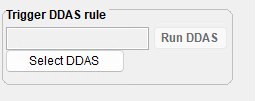
Click [Select DDAS] and you will get a popup message.
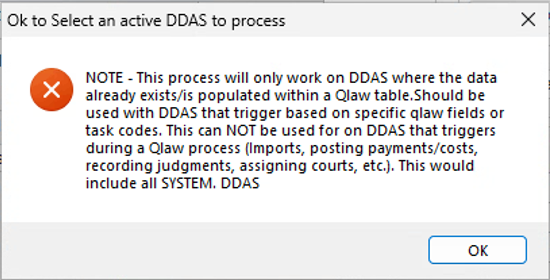
Click [OK] to proceed.
You will see a grid which shows all DDAS choices.
Click to view larger image
You will see the Ddasid (unique ID for each DDAS item) and Dbf.Fieldname (DDAS triggers). These are the normal triggers for each of the DDAS listed.
In the grid, click to highlight a DDAS item and click [Select record].
Click to view larger image
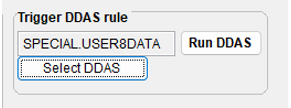
See above how the DDAS rule selected is not the ID but the trigger itself. If you proceed, you will run all DDAS for which the trigger matches.
If you only want one specific DDAS ID to run, you can duplicate your DDAS, activate it, and make the trigger a unique value. The best suggestion is to use username.username. Even though these are not functional DDAS triggers for Q-LawE to use, you can use them in Processing Options.
Click to view larger image
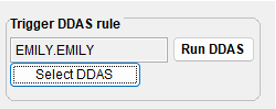
If you are comfortable with your selection, click [Run DDAS].
You will get a popup message confirming your selection of the DDAS trigger.
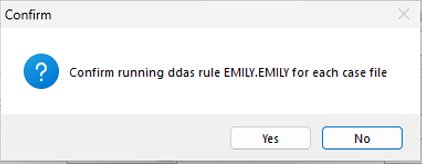
Click [Yes] to proceed.
You will get a popup message letting you know the DDAS ran on the first ourfile that met the DDAS conditions. It will ask if you want to proceed with running on all accounts.
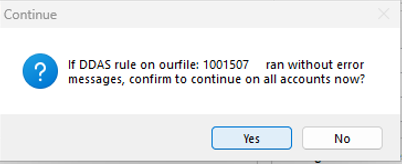
If you want to proceed, click [Yes]. If you want to review your list of accounts for condition and accuracy, click [No].
If you proceed, you will get a popup message confirming that processing is done, when complete.
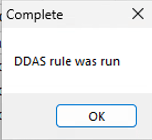
 Software Tip
Bulk Archive – New Feature
We’ve introduced a new feature to allow Senders to easily archive large numbers of accounts without uploading files.
- Watch the Bulk Archiving Demo.
- Learn about Bulk Archiving in the Analytics User Guide.
- In vExchange Analytics, navigate to Bulk Tools > Archiving.
Candidates
This Panel allows you to generate a list of accounts that are candidates for being archived.
- You can export the list for offline review in Excel or another spreadsheet.
- Use [Export Visible] to generate an Excel file in the correct format for later upload (see below).
History
You can see the results of all past uploads on this panel. Click on any row to see details about each row in the uploaded file.
Upload
Once you have finalized the list of accounts you want to archive, simply upload them on this tab.
- You can use the linked template or upload the file from [Export Visible] (see above).
- The file will be processed in the background, so you can navigate to other screens or even log out of the website.
- Once processed, all relevant 1405/2405 records will be generated and sent to the appropriate parties through vExchange.
Note: There is a per account bulk archiving fee as listed in the vExchange pricing chart. You can also subscribe to the Archive Candidate Report to identify accounts ready to archive (minimum 1-year subscription).
Latest VT Happenings
Conferences
 Isaac Goldman, CEO, Nicholas Arcaro, SVP of Business Development, and David Kullmann, Director of Technology Automation had a great time at the 2026 RMAi Executive Summit in Stevenson, Washington. If we didn’t get a chance to chat, don’t worry – let’s schedule a time to meet.
Ongoing collaboration matters to us, and we are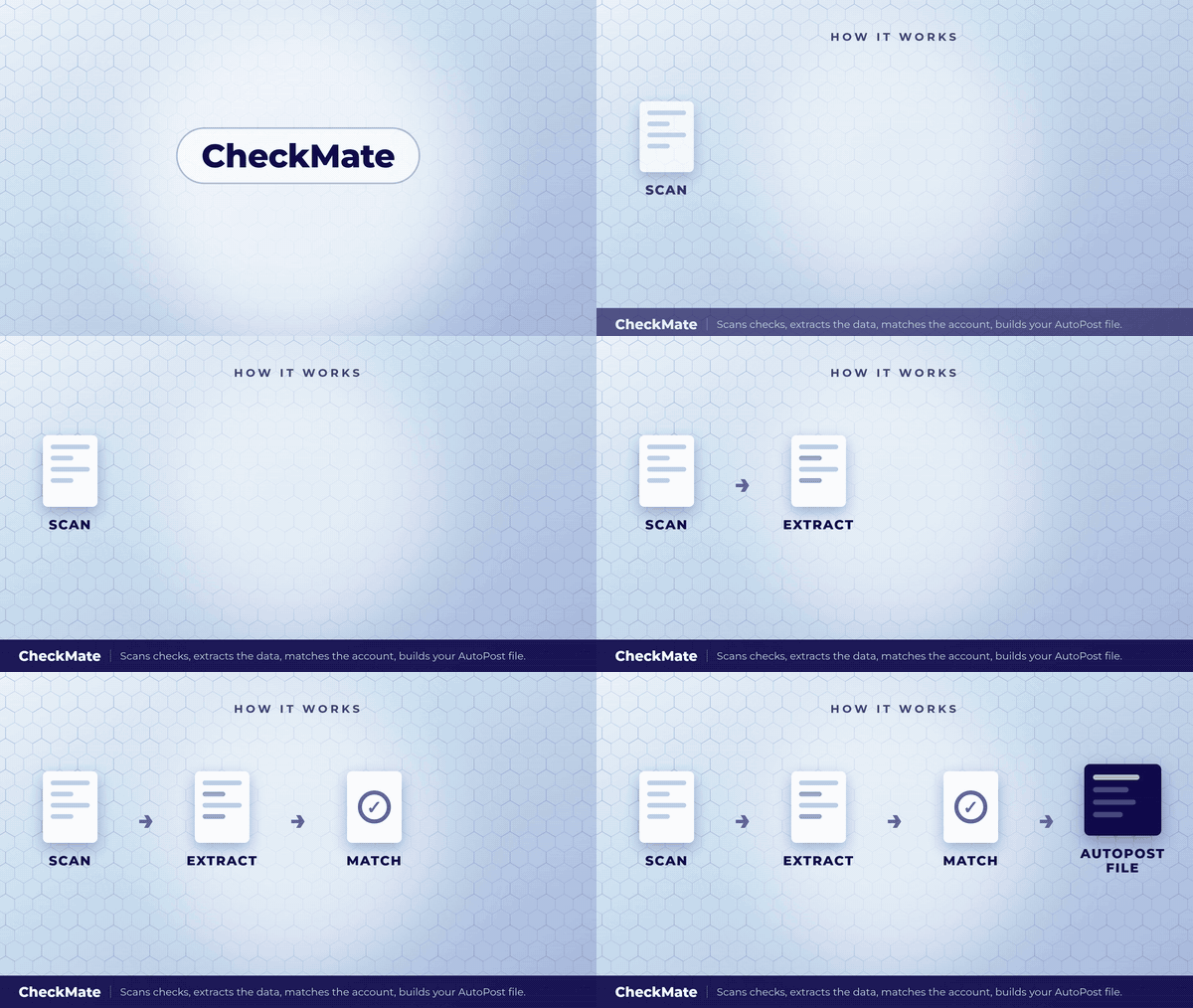 committed to supporting you in achieving your business goals.
Our team will also be in Orlando, Florida for the 2026 NCBA Connect Conference. We’ll be scheduling meetings, as well as showcasing our branded video during the welcome event – you don’t want to miss this! But if you have to…Click on the gif 👉
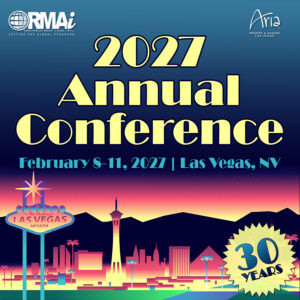 In February, our team will also be in Las Vegas, Nevada for the 2027 RMAi Annual Conference. We know it seems far away, but it will be here before you know it.
If we haven’t had the opportunity to connect at one of the previous conferences or if you’d like to continue a conversation. let’s schedule a time to meet.
The Mastermind Series, an ongoing program of virtual training sessions presented by Vertican’s top developers and Subject Matter Experts (SMEs), has been a success! Are you missing out?
Topics are developed to help improve clients’ ability to use our platform features and tools effectively and maximize efficiency. So, take advantage of this exceptional opportunity to learn directly from industry trailblazers and Vertican’s visionary developers.
- vMedia 4.0 | Watch here!
- NextGen API is Here! | Watch here!
Short on time? Mastermind Express videos are quick tutorials right from our Subject Matter Experts. These short-form tutorials are like video software tips.
Do you have a topic in mind for a future tutorial? We want to hear about it. Please send us an email with your suggestion.
- Bulk Archiving for Senders | Watch here!
- Milestone KPI Report | Watch here!
In Case You Missed It (ICYMI)
📢 When was the last time you updated and/or verified your vPortal account information?
Why? So you receive timely updates and your billing is accurate.
As part of our brand promise of data with integrity, Vertican is dedicated to ensuring successful and accurate delivery of our communications and services. One way we are backing this commitment is that we have added a last verification date field to your vPortal Client Profile. But we need your help.
If you need assistance with updating or verifying your vPortal account:
- Schedule a meeting with Account Management to walk you through your account profile and answer any questions.
- Use the vPortal Housekeeping Guide
- Open the Update & Verify vPortal Account section.
Account Managers are always available to assist you with account verification
Thank you for your prompt attention and helping us help you optimize your account experience.
📢 Do you know about Vertican’s Account Management Services and some of the ways they can help you get the most out of your business?
Your Vertican Account Manager is a trusted resource and liaison between your firm and our internal teams to help facilitate Professional Services and submit product enhancement requests. Account Managers are able to serve as an escalation point of contact should you have questions about your services or desire a status update.
If you don’t know who your Account Manager is, subscription clients can log in to vPortal and navigate to the My Vertican page to view their assigned Account Manager, along with direct access to their email address.
📢 Bookmarkable Help Center Links!
Save time searching for those commonly used Help Center pages by bookmarking them! After logging in to vPortal, go to the Bookmarkable Links page, and either bookmark the main page itself or any of the links on that screen!
📢 Keeping your Vertican software up to date is critical to your user experience and especially your business. Are you getting the latest software release notices and other informative communications from our team?
If you are not on our mailing list or have unsubscribed from our email notices, please click here to be in the know and ensure you hear about all the latest software features and updates!
vTrivia Contest
Summer 2026 Winners
Congratulations to the winners!
Joe Potrzebowski – Kohn Law Firm
Matt Latronica – Javitch Block LLC
Tom Connor – Kohn Law Firm
They were randomly selected for answering the following questions correctly:
1. True/False: Ask Goldie Support Agent will soon become the required primary first point of contact for support assistance.
A) True.
2. What does Vertican’s NextGen platform solve in the AI workflow process for legal collections?
B) The “Last Mile” between connecting AI insights directly to operational execution.
3. What does CheckMate do?
C) A tool that scans checks and extracts transaction data.
4. True/False: The Goldie Custom Agent shares your data with other users..
B) False.
Winners had the choice of one of these prizes:

Congratulations again to our three winners!
Fall 2026 Contest
Can you answer our vConnect quiz?
Three winners will be chosen at random from everyone correctly answering all four vTrivia questions based on this issue’s various articles. Contest ends November 30, 2026 at 5:00 p.m. ET Good luck!
Fall vTrivia Prizes Up for Grabs

Weighted Blanket
This Sherpa fleece weighted blanket integrates smooth fleece top and wool-like Sherpa reverse to offer a new level of coziness with a refined finish. The uniformed color easily fits in any setting and elevates your décor. Blanket is Queen size, and weighs up to 15 lbs.

Ecozy Sunrise Alarm Clock
This alarm clock acts as both a white noise machine and a sound machine and includes wake up lights with bluetooth speaker. It consists of 26 sleep sounds, 17 night lights, and a dimmable digital clock.

Heating Coffee Mug
16oz Self-Heating Coffee Mug, Smart Heated Coffee Mug Faster Direct-Contact Heating Up to 149°F, Coffee Mug Warmer Set with Auto Shut-Off. Winner be able to select the color of the mug.
 From all of us at Vertican, we hope you enjoyed this newsletter issue. We’ll see you soon!