


June 2026


Contents
- Isaac’s Essentials NextGen: Solving the “Last Mile” of AI in Legal Collections
- Lessons from an SME Turning Check Processing from Bottleneck to Breakthrough with CheckMate
- The Goldie AI Platform Sharing the Latest Developments!
- Goldie Rewards! Ask, Answer, Win – Introducing Our Goldie Rewards Program
- Goldie AI Trust Center Information on Privacy, Security, and Compliance
- Inside Vertican A Look Inside vPros/Professional Services
- Spotlight Abigail McCammon
- Software Tips Collection-Master
- Software Tips Q-Law/Q-LawE
- Software Tips vMedia
- Software Tips vExchange Analytics
- Latest VT Happenings Conferences / Mastermind / More...
- ICYMI In Case You Missed It
- vTrivia Enter to Win
Isaac’s Essentials
NextGen: Solving the “Last Mile” of AI in Legal Collections

There’s a reason the “last mile” is one of the most talked-about challenges in logistics. It’s often the shortest distance – but it’s also the most complex, the most expensive, and the most critical step in the entire journey. In fact, the final leg of a delivery most often accounts for more than half of total shipping costs.
Getting a package across the ocean is easy. Getting it from the local hub to your front door – that’s where things get complicated.
The same is true for AI.
Today’s AI tools can do astonishing things. They can analyze data, generate content, and deliver insights in seconds. Ask any modern AI tool to plan a trip, summarize documents, or recommend next steps – the results are fast, polished, and impressive.
But that’s not where real value is created. The real value – the part that actually impacts your business – is the last mile.
It’s not just knowing what to do, it’s doing it. It’s not just generating insight, it’s executing the workflow. It’s not just identifying the outcome, it’s completing the task – the task that’s inside your system, tied to your data, and aligned with your processes.
And that’s where most AI solutions fall short. They stop at the recommendation. You’re still left to make the calls, move the data, complete the steps, and ensure everything is properly reflected in your system. The “flashy” part is done – but the operational work remains.
In legal collections, that gap matters.
It’s the difference between scanning checks and actually posting payments. Between redacting documents and having them properly stored, indexed, and linked to the correct case. Between automation that looks good in a demo – and automation that actually drives efficiency, compliance, and profitability.
That final step – execution inside your workflow is the last mile.
And it’s exactly what NextGen was built to solve. NextGen is not just a modern platform or an API framework. It is the operational bridge between intelligence and action.
It enables our Goldie AI Platform to move beyond insight and into execution – securely interacting with your data, your systems, and your workflows in real time.
So instead of:
- reviewing AI-generated recommendations and manually completing tasks;
- moving data between systems; and
- relying on human intervention for final processing…
NextGen allows those actions to happen automatically – within your environment, governed by your rules, and fully integrated into your day-to-day operations.
Now this is where AI becomes truly valuable. Because the hardest part of any system isn’t building something that works in a silo. It’s making it work reliably within the complexity of real-world operations – integrated, compliant, and scalable.
That’s the last mile. And it’s where NextGen changes the equation.
As AI continues to evolve – with more powerful models, faster outputs, and broader capabilities – the gap between insight and execution will only become more important.
Firms that can close that gap will gain a meaningful advantage. Not because they have access to better ideas – but because they can act on these ideas faster, more accurately, and with less manual effort.
At Vertican, we believe the future isn’t just about “adding AI”. It’s about building an ecosystem where intelligence and operations are fully connected – where data flows seamlessly, systems communicate effortlessly, and outcomes are executed automatically.
That’s what the combination of NextGen and the Goldie AI Platform delivers. Because in the end, the value isn’t in what AI can suggest. It’s in what your business can actually get done.
Lessons from an SME
Turning Check Processing from Bottleneck to Breakthrough with CheckMate
In many conversations we share with clients, one recurring theme emerges: the tedious and time-consuming nature of check processing. It’s not that teams overlook its significance – in fact, they strongly recognize that efficient and accurate payment posting is vital for preserving healthy cash flow, maintaining client trust, and ensuring strict compliance. Yet, the process behind the scenes is fraught with challenges. Checks arrive in a myriad of inconsistent formats, incomplete data, and nuanced variations in names or account details, making seamless and confident matching an uphill battle.
Where does this lead? An inevitable surge of manual work tasked to your team, which is not only costly but also introduces significant risks. Our subject matters experts explain how CheckMate, Goldie AI’s revolutionary automation tool, is built to transform this landscape, relieving the burden on your employees and optimizing your operations. And whether or not you’re using Vertican software, CheckMate can integrate with your existing solutions.
The Hidden Cost of “Manual by Default”
Many businesses rely on multiple team members – or even outsourced vendors – to review, interpret, and match checks to accounts. At first glance, it feels manageable. But at scale, the process becomes expensive, time consuming, and fragile.
“Our research shows that processing just 5,000 transactions per month can exceed $8,000 in human capital costs alone,” explains David Kullmann, Vertican’s Director of Technology Automation. “And that doesn’t include the downstream impact of errors misapplied payments, rework, and compliance exposure.”
Even your best people will make mistakes when they’re doing repetitive, high-volume work under time pressure. This isn’t a people problem. It’s a process problem.
Shift From Manual Effort to Intelligent Automation
This is exactly where CheckMate changes the equation.
John Currey, Collection-Master Product Owner states, “Say goodbye to the pressure of “working faster. With CheckMate, the manual tasks that slow down teams are eliminated. It revolutionizes your current check-scanning workflow, transforming it into an automated, high-accuracy payment posting pipeline.”
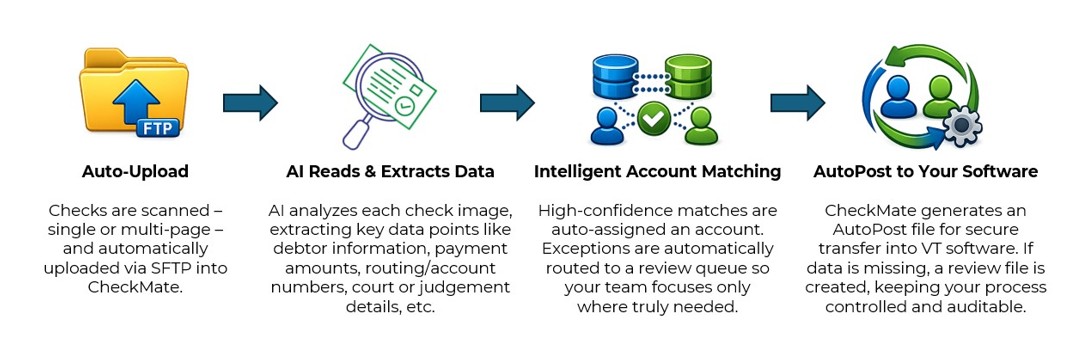
So, instead of treating each check as a one-off task, CheckMate applies AI automation to consistently read, interpret, and act on incoming payments – whether they’re garnishment or debt settlement checks, or consumer or attorney payments.
Here’s how that transformation happens:
What Changes for Your Team?
The impact isn’t incremental – it’s operational. Here are what our clients already using CheckMate are seeing:
- Same-day check processing, instead of multi-day backlogs
- Thousands of dollars saved per month by reducing reliance on manual labor or outsourcing
- Hundreds of hours returned to their teams
- Dramatically reduced error rates, minimizing rework and downstream issues
- Staff reallocated to higher-value work, like client service and exception handling
That last point matters more than most teams realize. When your best people are no longer stuck reviewing checks, they can focus on work that actually drives performance and client satisfaction.
Built with Trust at the Core
Of course, when AI is involved – especially with financial data – trust, security, and compliance are non-negotiable. Goldie AI was built with that in mind from day one.
- Data is handled securely with strict access controls and encryption
- Client data is never used to train public models
- Processing is designed to align with industry compliance expectations
- Auditability is built in, so you can track how data is handled and decisions are made
For a more detailed look at how Goldie protects your data, visit our Goldie AI Trust Center.
The Real Lesson: Automation Isn’t Only About Efficiency – It’s About Control
“The main takeaway we are seeing with CheckMate clients is not just about processing checks faster,” remarks Kurt Sund, Q-LawE Product Owner and Chief Innovation Officer. “We’ve created a controlled, reliable, and scalable system without added cost or risk. Manual processes break under pressure when they depend on humans to catch every inconsistency, every time. That’s not sustainable as volumes grow.”
CheckMate flips that model by standardizing the process, reducing variability, and ensuring that exceptions are the only thing requiring your team’s attention.
So, if your team is still treating check processing as a manual function, you’re not just paying for labor – you’re absorbing unnecessary risk and limiting your ability to scale. The businesses pulling ahead are the ones rethinking these workflows entirely. CheckMate isn’t just a tool – it’s a pivotal shift in how work gets done.
The Goldie AI Platform
Since launching our Ask Goldie AI support tool to all clients in November 2025, you’ve been able to get quick “How To” answers about our software and reduce time spent searching documentation.
Now, we have evolved Goldie from a support resource into a platform that can actively complete work for your team. Goldie Plus is our premium AI offering that combines two powerful capabilities: a dedicated Goldie Custom Agent built specifically for your firm and access to the Goldie Automation Suite.
Goldie Plus Custom Agent
- The custom agent is a private instance of Ask Goldie, using your firm SOPs and client manuals, as well as Vertican documentation.
- This means it returns responses based on your firm’s specific processes and any customizations to your VT software.
- Access to the agent will dramatically increase the speed at which your staff can find answers specific to your firm, and is available 24/7
Goldie Automation Suite
- CheckMate: Scans checks and extracts transaction data from garnishment, consumer, debt settlement, and attorney checks, then creates an auto post file for your VT software.
- Goldie Mailroom: Classifies and separates documents, matches them to the correct account, and renames them. Data is then extracted and mapped to the correct fields in your VT software.
- Redaction: Analyzes documents in bulk, detecting and redacting sensitive information based on your custom rules for each client and jurisdiction.
Enterprise-Ready AI
Built with data privacy, enterprise security, and compliance at the core.

The firms adopting Goldie AI will now have a major operational advantage tomorrow. See what Goldie Plus can do by booking a demo with Nicholas Arcaro, SVP Business Development.
Goldie Rewards: Ask, Answer, Win
Introducing our Goldie Rewards Program

What if getting the answers you need could also earn you a reward?
We’re excited to introduce our new Goldie Rewards program.
Here’s how it works:
❓ Ask a question using the Ask Goldie support agent
👍👎 Provide a thumbs up or thumbs down with feedback
🎟️ Get automatically entered to win
💬 Your feedback helps us improve the Ask Goldie support agent for the future
For a limited period of time, each month five lucky winners will receive a $200 gift card.
No forms. No extra steps. Just use Ask Goldie, provide your feedback and you’re in it to win it!
Start asking. Start winning. Questions? No problem, ask away at marketing@vertican.com. Because every good giveaway needs rules, click here!
Your Support Experience is Changing – Start Using Ask Goldie Now
Vertican’s Ask Goldie support agent is available to subscription clients at no cost as part of our continued investment in improving and modernizing the client support experience.
As part of our long-term support enhancement initiative, the Ask Goldie support agent will soon become the required primary first point of contact for support assistance. To help ensure smooth transitions with no disruption to your support experience, we are proactively working with clients now to complete setup, onboarding, and user adoption in advance of those future changes.
To make this process simple and seamless, our team is offering a complimentary concierge-style setup session where one of our agents will personally assist your office with:
- Accessing the vPortal/vStore
- Completing the $0 purchase/activation
- Setting up your firm’s initial account
- Adding your additional users’ invitations
- Walking through your first live support interaction
- Demonstrating how to quickly obtain answers and guidance through the Ask Goldie platform
The entire process is brief, straightforward, and designed to help your team begin utilizing the tool immediately while avoiding any future interruption or delays in support accessibility as we continue transitioning toward our future support model.
We strongly encourage firms not yet using Ask Goldie to complete onboarding as soon as possible so users can become comfortable with the platform well ahead of the upcoming support process changes.
Are you ready to take control? Coordinate a time with us today at Sabrena.Maloney@vertican.com — we look forward to helping your team successfully transition to the future of support!
Goldie AI Trust Center
Our Ask Goldie team created a trust center to support you and your needs and share how Goldie protects your data, and why you can trust it.
Why is Goldie Secure?
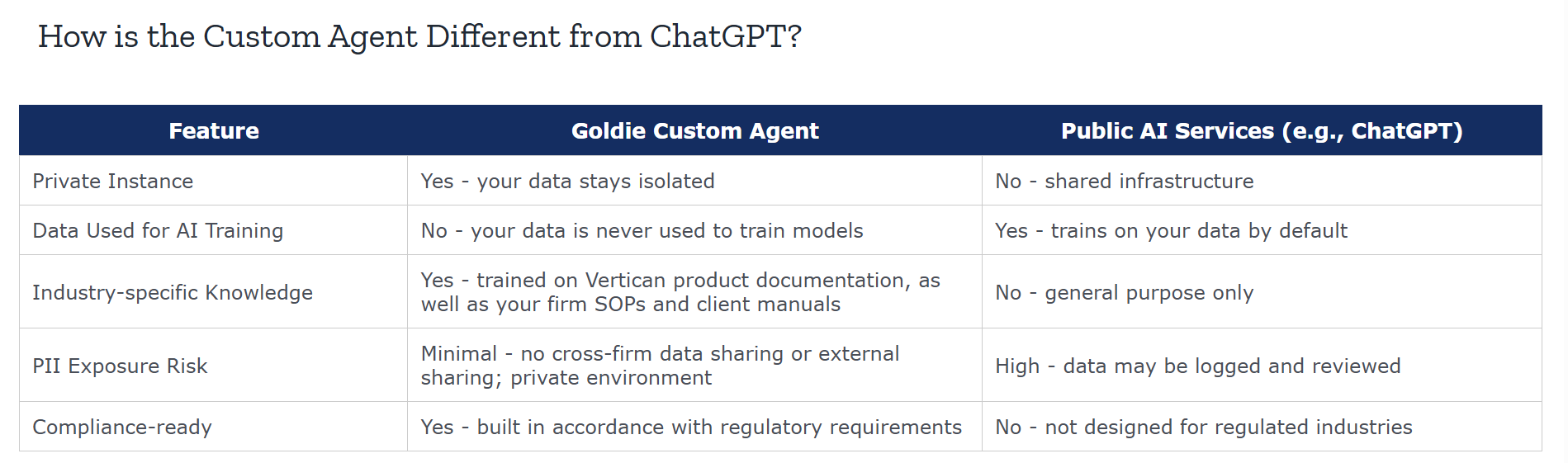
- The Goldie Custom Agent operates as a private AI instance for your firm. Unlike public, consumer AI tools (such as ChatGPT), the agent does not share your data with other users, use your data to train AI models, or expose your queries to the internet.
- The Custom Agent is hosted on enterprise-grade cloud infrastructure across Vercel (application hosting), Neon PostgreSQL on AWS (database), and Cloudflare R2 (file storage). All providers maintain SOC 2, ISO 27001, and GDPR certifications.
- Data is processed in the United States.
A Look Inside vPros/Professional Services
Success Story: Streamlining Sender Onboarding with vPro Services
SUMMARY
- PRODUCTS: Q-Law (also applicable to Q-LawE and Collection-Master), and Ask Goldie AI Support Agent
- PROBLEM: A small collections firm needed to onboard multiple new Sender clients efficiently, without the cost or complexity of custom development.
- SOLUTION: Vertican’s vPro Services team implemented a flexible case placement and post-placement automation solution using existing Q-Law tools.
- IMPACT: The firm reduced manual effort, avoided additional hiring, accelerated onboarding, and achieved rapid ROI – while setting the stage for future automation.
PROBLEM
A Q-Law client, an efficient but small collections firm, needed to onboard three new Sender clients with similar requirements. Manual case entry was not a sustainable option, with each case taking five to eight minutes to input and ongoing adjustments expected due to fluctuating balances.
The firm needed a solution that balanced speed, cost, and scalability – without overengineering the process or requiring internal technical expertise.
SOLUTION
Working closely with Vertican Client Success Manager Michelle Samlaska, the firm explored their options and ultimately chose a guided, hands-on approach. They purchased the Onboarding New Sender/Client with Placement & Post-Placement Automation package from the vPro Package Service Directory.
Through this engagement, Michelle:
- Conducted an initial discovery consultation to clarify data standards, Sender requirements, and reporting expectations
- Built and mapped a flat-file case placement import tailored to each Sender’s specifications
- Configured payment and adjustment imports to support ongoing balance changes
- Reviewed remittance and reporting needs, leveraging native Q-Law functionality where possible
- Delivered step-by-step documentation so the firm could confidently run and maintain the processes
Without the need for extensive custom programming, the firm received a practical, right-sized solution that used Q-Law’s existing capabilities – implemented correctly the first time.
As an added advantage, the client also licensed Ask Goldie, Vertican’s free AI support agent for all subscription clients, giving them on-demand access to product guidance and support as they moved forward.
IMPACT
The firm significantly reduced manual work, avoided hiring additional staff, and accelerated Sender onboarding – enabling faster time to revenue. With automation in place, this small firm’s investment quickly paid for itself, especially as case volumes increased.
Equally important, programming now supports future enhancements they may need down the road. As the firm grows or Sender requirements evolve, additional automation and reporting can be layered in without starting from scratch.
Related Links:
Spotlight
Abigail McCammon

What is your title and when did you begin working at VT? I am the Human Resources Manager at Vertican Technologies. I joined the company full-time in January 2024 after interning here in the summer of 2023.
What sort of work did you do before joining Vertican? Before joining Vertican, I worked for a staffing company. While I gained valuable experience there, I realized I wanted to expand my scope within HR and be involved in a broader range of responsibilities beyond staffing, where each day tends to look very similar.
What is a typical day at Vertican like for you? There really isn’t a “typical” day at Vertican, which is one of the things I enjoy most. I work closely with the Finance team, and my day can range from assisting with financial modeling to meeting with our benefits partners on initiatives like company wellness programs to running payroll. The variety keeps things both challenging and exciting.
What do you like most about working for Vertican? What I appreciate most about Vertican is the opportunity for growth. I’ve consistently been given the chance to take on new responsibilities and expand my role in ways that wouldn’t typically happen in a more traditional organization. It’s been a great environment for both personal and professional development.
 What was your very first job and how old were you? My first job was working at my school’s summer camp when I was 14. I loved being active, running around, and spending time with the kids. It never really felt like work.

If you could learn anything new, what would it be? I’d love to learn how to bake!
What (else) do you like to do outside of work? Outside of work, I enjoy spending time with friends, reading, and being outdoors (especially at the beach).
What is something about you that may surprise your colleagues? Outside of work, I enjoy spending time with friends, reading, and being outdoors (especially at the beach). Ice hockey games are my favorite to go to, and my favorite concert experience (twice!) was Taylor Swift’s Eras Tour.

Do you have a favorite movie, artist and/or book?
Movie: Kicking and Screaming
TV: New Girl
Musical or Other Artists: Taylor Swift, Gracie Abrams, Sabrina Carpenter, and more.
Book or Author: Sarah J. Maas
Please share a favorite quote: “It is our choices… that show what we truly are, far more than our abilities.” — Albus Dumbledore
 Software Tip
Creating Excel Logic in 3-2 Reports
[3-2] is where custom reports can be generated. These can pull from a wide variety of tables and fields within Collection-Master. Some of the available fields are also special, calculated values. Even with all the available options, sometimes the desired output requires some extra formatting or logic. Many firms can get their desired results using Microsoft Excel to either do some math using the fields available or a Microsoft Excel formula to arrive at the desired output.
Using the Custom Report Setup, Excel logic can be entered into the “Data Source.” The appropriate column can be specified by entering “[X]” where X represents the column you want to use in your formula. Below is an example demonstrating how to retrieve the last four digits of an SSN.
-
By default, Collection-Master doesn’t have a field for just the last four digits of a Social Security number.
-
In the first column, the debtor’s SSN is defined. Since that’s in the first column, it’s identified as column “A.”
-
In the second column, the Excel RIGHT() function is used.
-
By inputting [A], the formula references the first column of the [3-2] report. If the columns are rearranged due to adding new columns or altering the order, change [A] to represent the new appropriate location.
Click to view larger image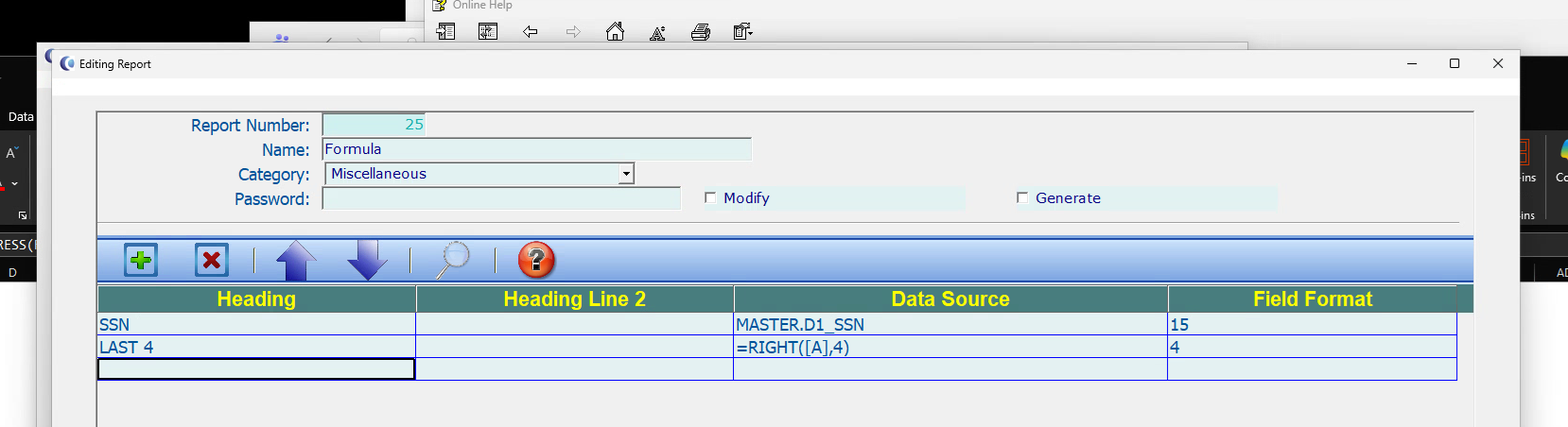
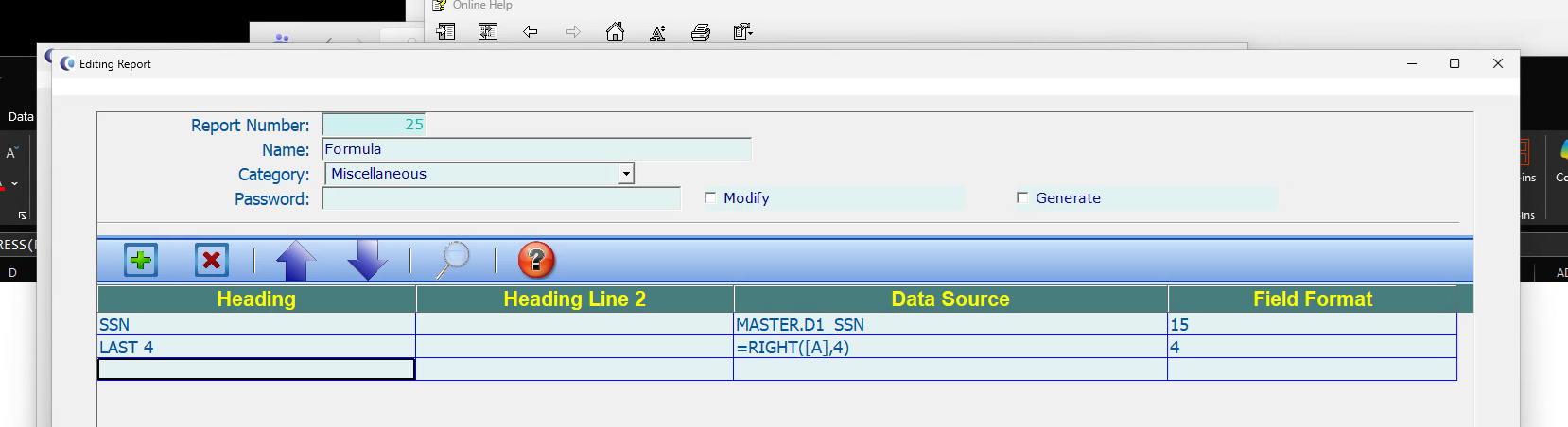
When the Excel report is printed, it will now convert [A] to use the INDIRECT() function in order to calculate the correct, corresponding column.
Click to view larger image
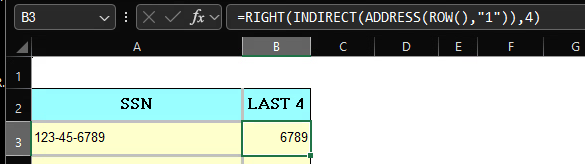
Since these are still formulas, removing the original “SSN” column requires taking any columns that have formula lines, copying the column, then using the “Paste Values” function in Excel so that it re-populates the columns with the resulting values of the formula, rather than the formula itself. Once completed, the original SSN column can be deleted and only the last four digits of the SSN within the document can be kept.
Click to view larger image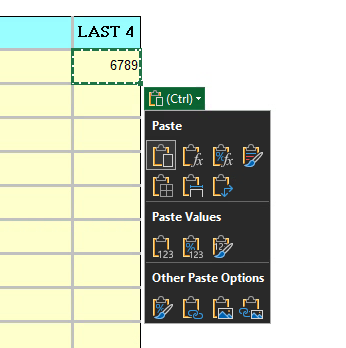
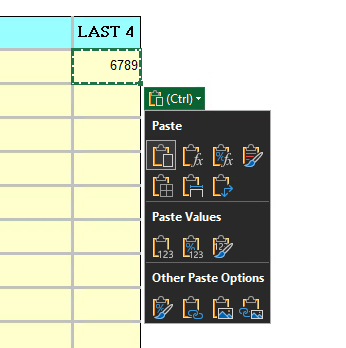
This functionality can be used with any other Excel function. As long as Excel can interpret the formula, it is what will print in the cell. Leveraging Excel is especially useful to get more functionality out of your [3-2] reports.
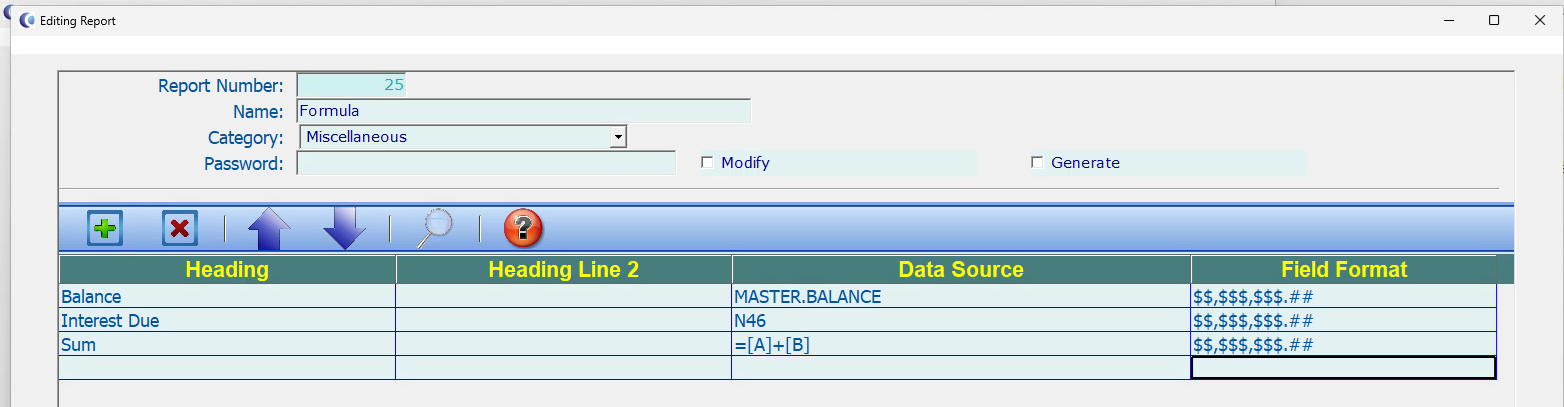
Mathematical calculations can also be performed using any number of columns. Below, the example demonstrates how to add columns 1 and 2. If the source fields should be removed from the finished Excel report, the resulting values in the columns will need to be pasted, just like in the above example.
Click to view larger image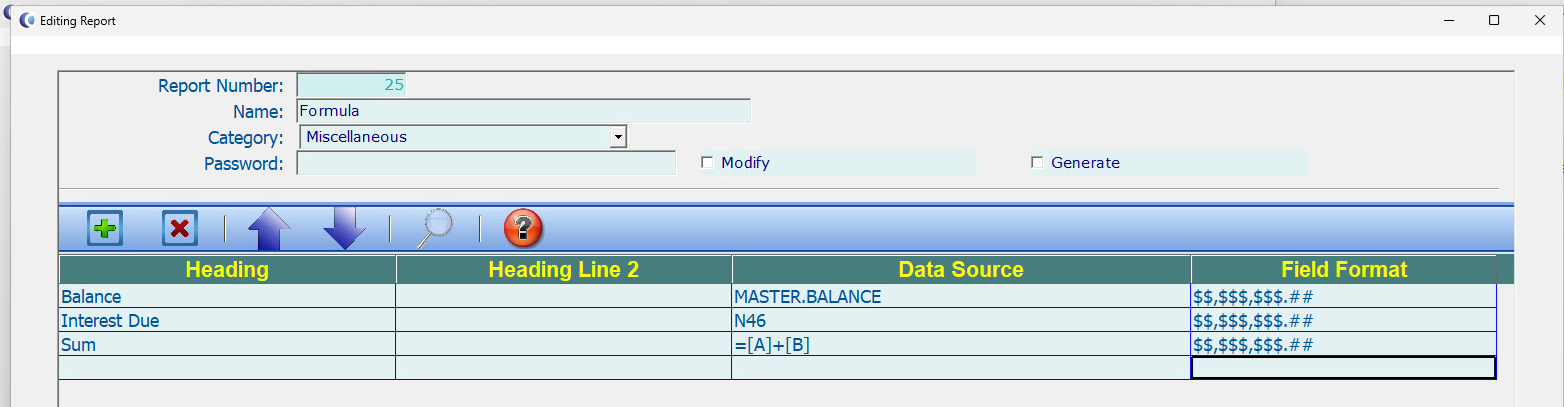
 Software Tip
Semantic Versioning
This tip applies to both Q-Law and Q-LawE.
Did you know Q-Law’s version number received a makeover in January 2026?
Instead of the old style, “Vers: 04/08/2025 QRev: 8243a” (a date, a revision number, and a patch letter), Q-Law switched to the industry standard called semantic versioning. That means you’ll see versions in the following format:
Version: 8.1.0_02/17/2026
Here’s what it means in plain English:
-
8 = the major version (big changes)
-
1 = the minor version (the main release number within that major version—this goes up with each primary release)
-
0 = the patch level (bug fix releases)
-
0 = first release
-
1 = first patch
-
2 = second patch, and so on
-
04/08/2025 = the date that version was created (the build date of what you have installed)
Quick example:
-
If you’re on 8.1.2, you’re on major version 8, the first primary release, and you’ve got two rounds of fixes applied.
-
Bottom line: you’ll be able to tell immediately whether you’re on a brand-new release or a patched one — no decoding required
Click to view larger image

 Software Tip
Advanced Blank Page Suppression
Overview
The Blank Page Suppression feature automatically discards pages that are completely or partially blank during the scanning process. This feature allows you to specify the percentage of white space used for each side of the page or to select the minimum image size a scan page can be for vMedia to consider it to be a non-blank page.
Procedure
-
On the Image Control window, select the image database and click [Scanning Module].
-
On the Scanning Module main window, click [Image Control].
-
The Scanner Image Control dialog box opens. Click [Advanced Scanner Features].
-
Click [Blank Page Suppression] on the vMedia Advanced Features dialog box.
- The Delete Blank Page Threshold dialog box opens.

-
-
Front Image and Back Image – Same options, different page sides.
-
By Minimum Image Size bytes – If selected, enter the minimum number of bytes per page that will be saved as a scanned image. The number is based on format and resolution. For example, when scanning TIF images at 200 dpi, enter 300 – 400 bytes here. For 300 dpi, enter 1000 – 1200 bytes. You may need to experiment with these values for desired results.
-
By Percentage of White Space – In lieu of image size, set the percent of white space to be used for the different page sides.
- When all selections have been made, click [OK].
-
 Software Tip
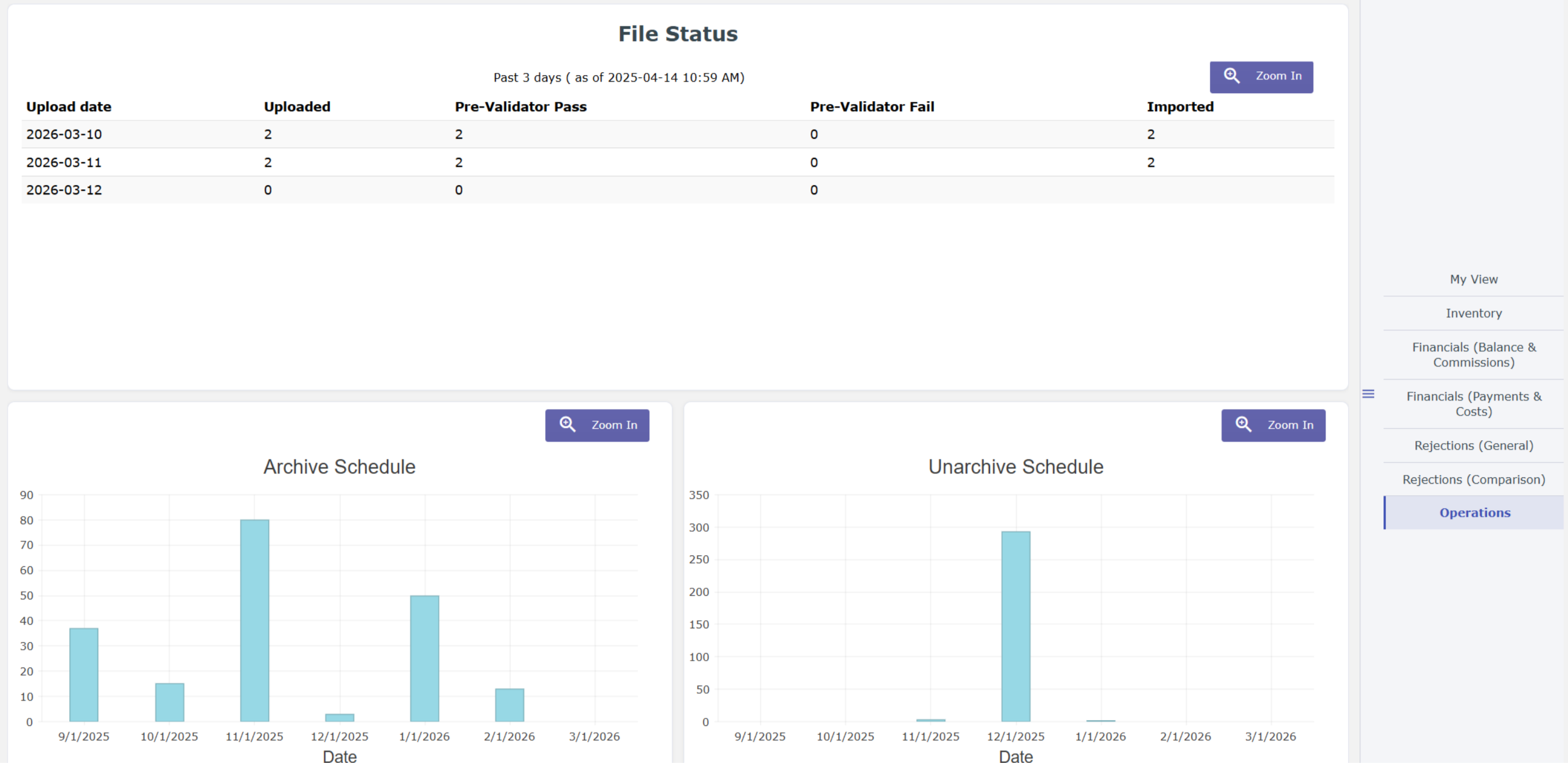
New My Activities
The My Activities page has been redesigned to load faster and let you focus on what’s most important to you.
Improved Performance
All of the charts now load significantly faster. This makes it possible to quickly review your most important KPIs without waiting for every chart to load.
My View
You can pick up to four charts that are most important to you. You’ll see these charts first whenever you visit My Activities.
Click to view larger image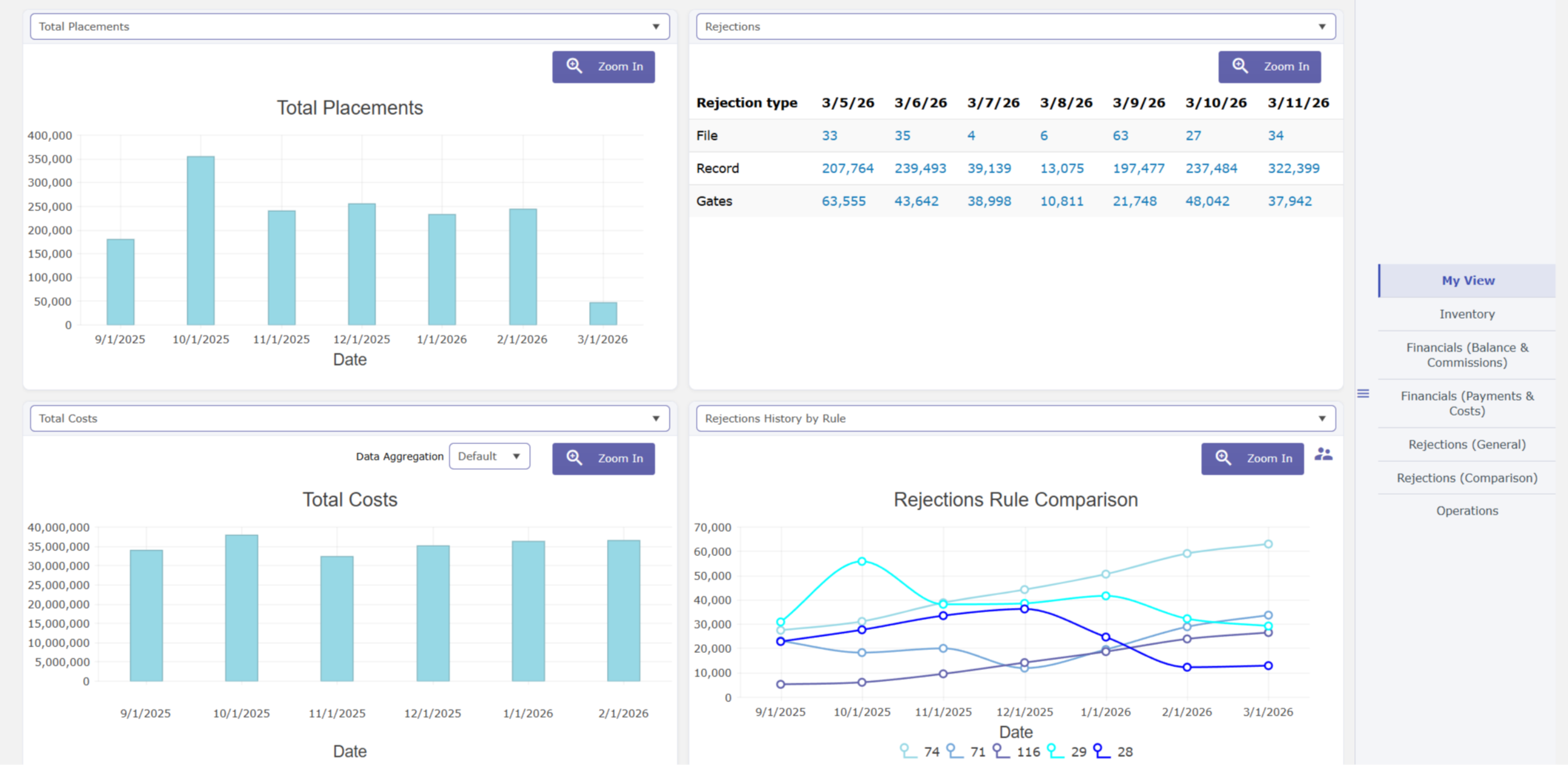
Tab View
The charts have been organized into logical groups so that you can quickly see related data without scrolling. In the screenshot below, when we click Operations from the right panel, the associated widgets display.
Click to view larger image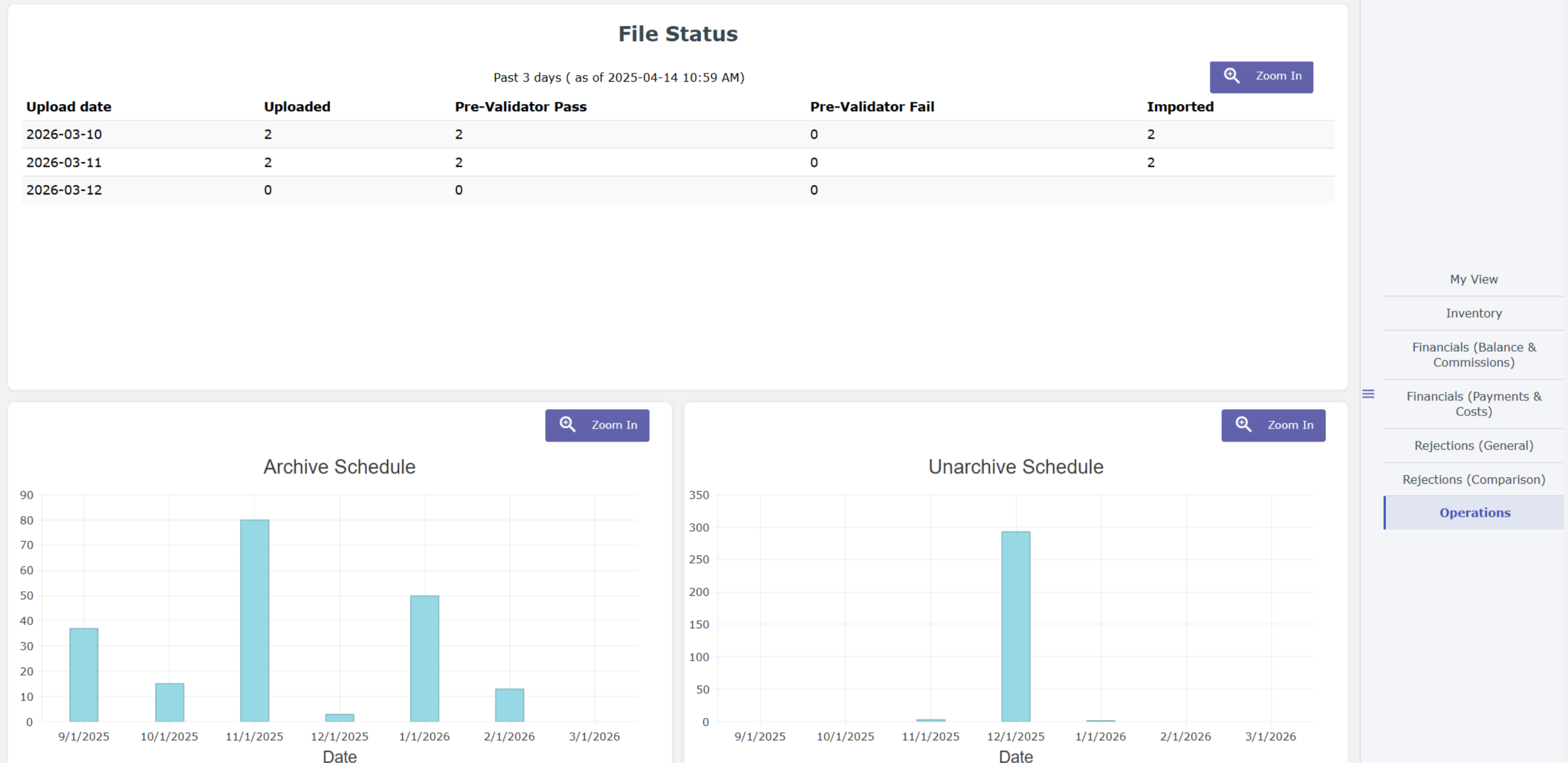
Latest VT Happenings
Conferences
Isaac Goldman, CEO, and Nicholas Arcaro, SVP of Business Development, had a great time at the 2026 NCBA Executive Experience in Ponte Vedra, Florida, where our Goldie AI Automation video was showcased. If you missed the video, don’t worry – Watch here!
 Ongoing collaboration matters to us, and we are committed to supporting you in achieving your business goals.
We also had the opportunity to hold an exclusive demo regarding our new Goldie AI automation tool, CheckMate. Did you attend the demo? If not, let’s schedule some time and chat.
Our team will also be in Stevingson, Washington for the 2026 RMAi Executive Summit Conference. We’ll be scheduling meetings, including demos on Vertican’s new Goldie AI automation suite.
 In October, our team will also be in Orlando, Florida for the 2026 NCBA Connect. We know it seems far away but it will be here before you know it – we are so excited to schedule meetings and reconnect or get acquainted for the first time.
If we haven’t had the opportunity to connect at one of the previous conferences or if you’d like to continue a conversation. let’s schedule a time to meet.

The Mastermind Series, an ongoing program of virtual training sessions presented by Vertican’s top developers and Subject Matter Experts (SMEs), has been well underway! Are you missing out?
Topics are developed to help improve clients’ ability to use our platform features and tools effectively and maximize efficiency. So, take advantage of this exceptional opportunity to learn directly from industry trailblazers and Vertican’s visionary developers.
- vMedia 4.0 | Watch here!
- SQL-SYNC 2.1A.002 is Here! | Watch here!

Short on time? Mastermind Express videos are quick tutorials right from our Subject Matter Experts. These short-form tutorials are like video software tips.
Do you have a topic in mind for a future tutorial? We want to hear about it. Please send us an email with your suggestion.
- File Level Rejections in vExchange Analytics | Watch the recording here
- vMedia Converting Hanna to Spectrum Importer | Watch the recording here
In Case You Missed It (ICYMI)
📢 When was the last time you updated and/or verified your vPortal account information?
Why? So you receive timely updates, accurate billing, and prompt responses to support requests.
As part of our brand promise of data with integrity, Vertican is dedicated to ensuring successful and accurate delivery of our communications and services. One way we are backing this commitment is that we have added a last verification date field to your vPortal Client Profile. But we need your help.
If you need assistance with updating or verifying your vPortal account:
- Schedule a meeting with Account Management, who will walk you through your account profile and answer any questions.
- Submit a support request through your product’s VSA or on vPortal.
- Use the vPortal Housekeeping Guide
- Instructions to Verify Client Profile are in the Update Client Profile section.
Account verification assistance will not count against your incidents.
Thank you for your prompt attention and helping us help you optimize your account experience.
📢 Do you know about Vertican’s Account Management Services and some of the ways they can help you get the most out of your business?
Your Vertican Account Manager is a trusted resource and liaison between your firm and our internal teams to help facilitate support resolutions and submit product enhancement requests. By meeting with Client Success regularly to review support cases, Account Managers are able to serve as an escalation point of contact should you have questions about your case or desire a status update.
If you don’t know who your Account Manager is, subscription clients can log in to vPortal and navigate to the My Vertican page to view their assigned Account Manager, along with direct access to their email address.
📢 Bookmarkable Help Center Links!
Save time searching for those commonly used Help Center pages by bookmarking them! After logging in to vPortal, go to the Bookmarkable Links page, and either bookmark the main page itself or any of the links on that screen!
📢 Keeping your Vertican software up to date is critical to your user experience and especially your business. Are you getting the latest software release notices and other informative communications from our team?
If you are not on our mailing list or have unsubscribed from our email notices, please click here to be in the know and ensure you hear about all the latest software features and relevant industry happenings!
vTrivia Contest
Winter 2026 Winners
Congratulations to the winners!
Alison McDonald – Roosen, Varchetti & Oliver PLLC.
Jonathon Kream – Kream and Kream
Eileen Devereux – Converging Capital
They were randomly selected for answering the following questions correctly:
1. What is not one of our newly release vPro Packages?
B) Ask Goldie.
2. What can you expect to see in our upcoming vMedia 4.0 Release?
D) All of the above.
3. With the CM 9.1L.022 Release, Collection-Master will now read as:
A) vMedia.INI
4. Which one of these actions is not part of the new Ask Goldie Prompt Guide:
D) Give ambiguous instructions
Winners had the choice of one of these prizes:

Congratulations again to our three winners!
Summer 2026 Contest
Can you answer our vConnect quiz?
Three winners will be chosen at random from everyone correctly answering all four vTrivia questions based on this issue’s various articles. Contest ends August 31, 2026 at 5:00 p.m. ET Good luck!
Winter vTrivia Prizes Up for Grabs

Wireless Meat Thermometer
This set includes everything you need for grilling, a digital wireless meat thermometer, a quality knife, a knife sharpener, and a two-pronged fork, so you’re fully equipped to cook.

Professional Shaved Ice Machine
This powerful ice shaver is designed to make fluffy shaved ice for classic snow cones, refreshing slushies, and even Icee machine-style frozen treats. It’s the ideal snow cone machine for parties, family gatherings, or a cool summer dessert, providing endless fun for all ages.

Heavy Duty Utility Wagon
Basic Collapsible Heavy Duty Utility Wagon for Outdoor Sports, Camping, Garden, and Shopping, 265 Pounds Capacity
 From all of us at Vertican, we hope you enjoyed this newsletter issue. Have a great summer and we’ll see you soon!