

August 2025


Contents
- Isaac’s Essentials AI future is here
- Vertican Releases AI-Powered Support Tool Early Beta Adopters Receive Priority Access
- Have you heard the latest news? NextGen
- Collection-Master Database Integrity Tool Backing the Vertican Brand Promise
- Lessons from an SME Digital Collections: How PaymentVision Empowers Firms
- Inside Vertican A Look Inside vPros: Q-Law Partial Migration Made Seamless
- Spotlight Igor Feldman
- Software Tips Collection-Master
- Software Tips Q-Law/Q-LawE
- Software Tips vMedia
- Software Tips vExchange Analytics
- Latest VT Happenings Conferences / Mastermind / More...
- ICYMI Catch up on the Latest at VT
- vTrivia Enter to Win
Isaac’s Essentials
AI future is here

From “How” to “Do”: The Future of AI at Vertican
There’s a familiar feeling in the air at Vertican – one of momentum, innovation, and something just short of reinvention. That’s because we’re at the threshold of a new era in our technology, and it’s not just about features and roadmaps anymore. It’s about fundamentally rethinking what’s possible when artificial intelligence is not just a tool you use at work, but an active partner in doing your work.
You’ve already heard us talk about NextGen, and for good reason. It’s our foundation for what’s to come: an evolving platform that’s preparing our ecosystem for scale and next-level productivity. But just as NextGen is transforming the structure of our products, our new AI support tool, Ask Goldie, is redefining the user experience across all of them.
Let me explain.
The “How” Era of AI
Right now, most of the AI world is centered around the “how.” And to be clear – this is not a small thing. I love asking ChatGPT how to make gluten-free pancakes or how to configure my Outlook settings. It’s like having an endlessly patient, super-knowledgeable assistant ready to teach you things step-by-step. This is exactly the kind of help Ask Goldie provides in its current beta form.
You can Ask Goldie things like:
- “How do I post a payment in Q-LawE?”
- “How do I resolve error code 4152 in Collection-Master?”
- “Where do I find the vMedia backup settings?”
These are not theoretical examples – this capability exists right now. Ask Goldie is tapping into our Knowledge Base articles, Help Manuals, Help Center documentation, and other resources to give beta users immediate, accurate answers. It’s powerful, it’s smart, and it’s only the beginning.
From “How” to “Do”
The future gets even more exciting when we move beyond “how” and into “do.” That’s where things start to really change.
Imagine opening Q-LawE or Collection-Master and giving the following instructions:
- “Ask Goldie to sort and label the charge off statements from my Client.”
- “Ask Goldie to reconcile my trust account.”
- “Ask Goldie to generate and send settlement letters for these accounts.”
That’s not help or guidance – it’s action. It’s what I like to call Do and Review.
We already live this way in other tools. I ask AI to draft an email, then I tweak it to add my own voice. I ask it to create a spreadsheet, then I verify and make slight adjustments. We’re not just learners anymore – we’re collaborators. That’s the direction Vertican is going next.
What happens when Ask Goldie becomes embedded directly into Collection-Master, Q-LawE, vMedia, and more – so it’s not just answering questions, but performing actual tasks within your workflow?
In the near future you will be able to:
- Instruct Ask Goldie to open Collection-Master, download a new template from your Client, and import it.
- Use Ask Goldie to schedule and execute an automatic import every Monday and Wednesday.
- Create and apply a payment plan across 25 files in one step.
That’s a giant leap – and that’s what we’re building.
The Next Frontier: Trust
The final evolution is when you no longer double-check the AI. You trust it. That’s the real magic. That’s when AI stops being a helper and becomes a partner.
Picture this:
- You tell Ask Goldie, “Redact all Social Security Numbers in this document set.”
- And then you move on with your day.
- No opening each file. No squinting to make sure the last four digits are gone.
- No continuous need to manage outsourced, low wage resources.
- You trust that Goldie did the job, every time, just like your best product users would.
That’s where Vertican is headed. A place where AI not only helps you learn how and gets it done but helps you do it right – consistently and at scale.
“How” Is Happening Now
We recently introduced Ask Goldie in beta, and I want to thank all of you who jumped in with us. It’s early, but the energy is electric. Ask Goldie is already showing how AI can improve your day-to-day work, with answers that are fast, accurate, and context aware.
If you haven’t already joined our Ask Goldie Beta Group, there’s still time. Watch our recent live demo to take a look at where AI at Vertican is headed. Find out more about the Ask Goldie beta group.
From Essentials to Exceptional
The truth is, we’re not reinventing your business processes from scratch. We’re building on what already works – just like you do. And we’re making it better, faster, and more efficient using tools that actually understand your industry and your work.
Ask Goldie is not simply a sign of the times. It’s a signal. A signal that Vertican is not just building technology – but shaping the future of how legal recovery gets done.
- From “how do I…”
- To “can you do this for me?”
- To “I trust that it’s done.”
That’s the evolution. That’s where we’re going. And I couldn’t be more excited for the road ahead.
Vertican Releases AI-Powered Support Tool to Transform Legal Recovery Operations
Early Beta Adopters Receive Priority Access and Influence Product Development
Vertican Technologies, a global leader in legal collections software, has announced the launch of its AI-powered support agent, Ask Goldie, a transformative tool built to enhance user productivity, streamline support workflows, and deliver real-time, intelligent assistance across its software ecosystem. Implementation begins with Collection-Master and will be rolled out to each product in succession.
The company has invited a select group of Collection-Master clients to join the beta release of this latest innovation. This early-access opportunity allows participating firms to try the AI agent, provide feedback, and gain priority access to the production release. The beta is free to join, and future versions of the tool will be securely customized for each client’s organization.
The Ask Goldie AI solution is part of Vertican’s broader initiative to integrate intelligent automation into its major platforms, including Collection-Master, Q-LawE/Q-Law, vExchange, vMedia, and SQL-Sync. By connecting to relevant PostgreSQL schemas, the AI agent will offer context-aware guidance and automated troubleshooting, helping firms operate more efficiently without compromising security or compliance.
Have you heard the latest news?
NextGen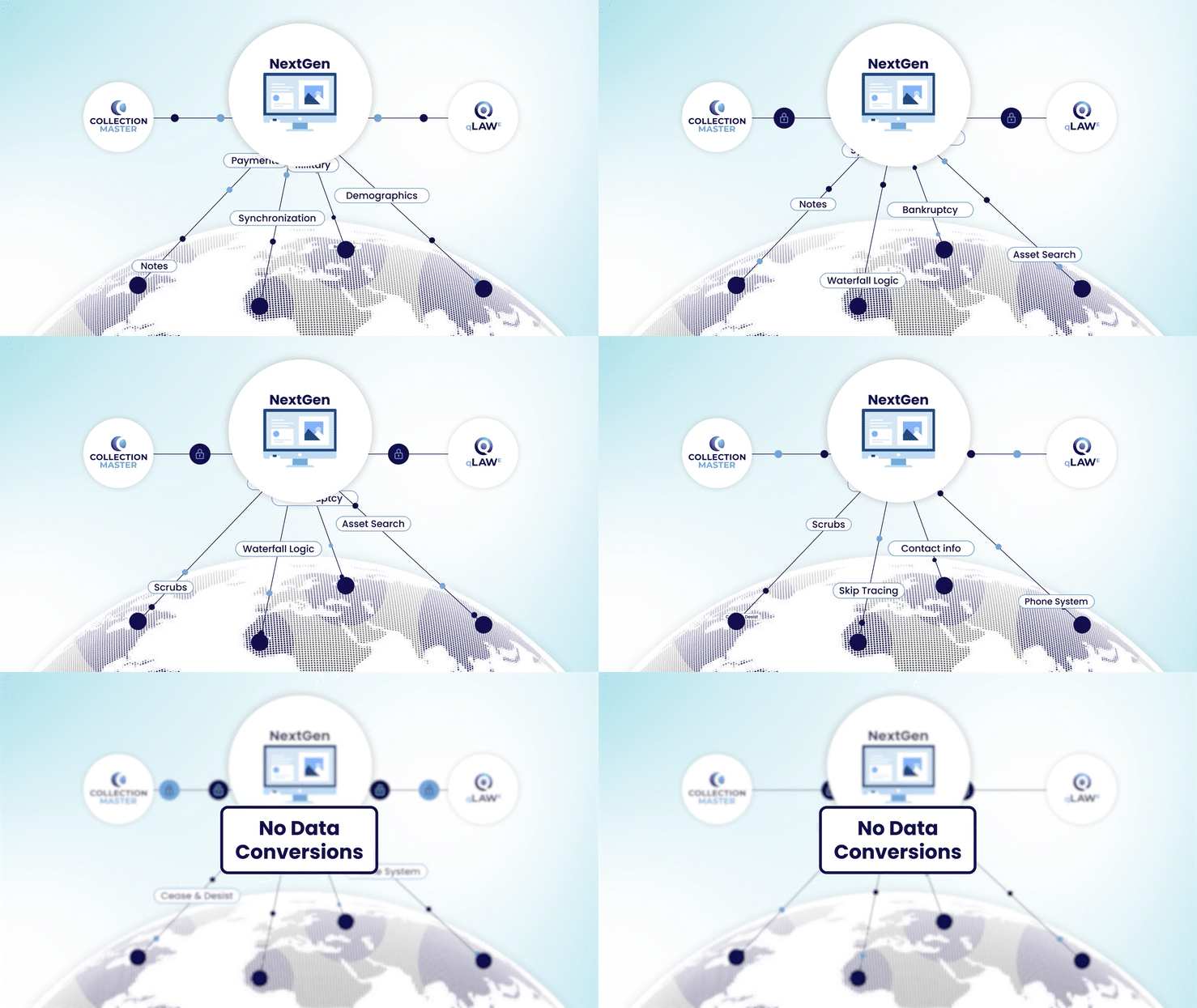
For decades, data has been constrained within on-premise servers, limiting efficiency. Now, through Vertican’s fully secure, cloud-hosted web application, collection law firms and agencies will be able to dynamically move and interact with their data – without the need for complex data conversions.
NextGen is a groundbreaking functionality built into Collection-Master and Q-LawE, unlocking a new reality where all stakeholders can interact with the data like never before.
Learn more by watching our NextGen video or reading our press release!
Collection-Master Database Integrity Tools
Backing the Vertican Brand Promise
- THE PRODUCT: Collection-Master
- THE FEATURE: Database Integrity Tools (FIXIT)
- THE FUNCTIONALITY: Database Integrity Tools (FIXIT), which is designed to validate and repair any issues within the database.
- Database Integrity Tools (FIXIT) automatically checks for problems during the Collection-Master update process and alerts users if any issues are found. It creates INDEX.DUP and Excel worksheets only if there is a problem, ensuring that users are aware of any data integrity issues.
This feature was designed to ensure reliability and maintain database integrity by proactively identifying and resolving issues.
How Database Integrity Tools (FIXIT) Works:
- Automatic Checks: FIXIT automatically performs integrity checks as part of the update process. This means that every time the system is updated, it checks for potential issues in the database without requiring manual intervention.
- Problem Identification: If there are any problems detected during the integrity check, FIXIT creates INDEX.DUP and Excel worksheets to report these issues. This immediate identification allows users to be aware of any data integrity problems as soon as they occur.
- Resolution and Reporting: When problems are found, FIXIT provides detailed reports on the issues and the actions that should be taken to resolve them. Users can rerun the test to clear the INDEX.DUP message once the problem is fixed, ensuring that the database is restored to a healthy state.
- User Alerts: If a problem is detected, all users are alerted with an INDEX.DUP message at startup. This ensures that everyone is aware of the issue and can take appropriate action to address it.
How FIXIT’s Proactive Nature is Automatic:
- Early Detection: By automatically checking for issues when your firm processes updates, FIXIT helps detect problems early before they can escalate into more significant issues that might affect data integrity or system performance.
- Automatic Monitoring: FIXIT’s integration into the update process means that the database is monitored for integrity, reducing the risk of undetected problems at each update, ensuring that the database is consistently reviewed for integrity issues
- Immediate Action: The tool provides immediate feedback and instructions for resolving issues, allowing users to take action quickly to maintain the integrity of their data.
- Prevention of Data Loss: By identifying and resolving issues early, FIXIT helps prevent data loss and corruption, which can be costly and time-consuming to fix.
Manual Run Option
While FIXIT checks during updates, users are encouraged to run the tool manually if they suspect any issues or want to ensure the database’s health between updates. The menu path [4-1-S-5-1] allows you to run FIXIT manually as well. When you want to check specific tables, launch the tool and select the Validate option and the specific table you want to check. Then simply use the Repair option to fix the table. Typically, users only need to do this when they have a known issue with a table, and they want to proactively check it. It’s always good practice to create a backup of any tables before making any changes.
Overall, the robust and proactive nature of FIXIT ensures that your database remains reliable and secure – that’s Vertican’s brand promise and commitment to you …. Data with Integrity!
For more details on how to implement this powerful feature, refer to the Database Integrity Tools documentation in your Collection-Master Help Manual or purchase vPros hours to schedule Professional Services.
Digital Collections
How PaymentVision Empowers Firms
In today’s fast-paced digital landscape, collecting debt efficiently and securely is more important than ever. That’s why Vertican is proud to spotlight the powerful integration between Collection-Master and our trusted payment processing partner PaymentVision. PaymentVision is the only payment processor that has direct in-app integration with Collection-Master.
Seamless Collection-Master Integration
PaymentVision integrates with Collection-Master’s Paperless File and supports:
- Quick Payment: process ad hoc payments immediately
- AutoPost: automatically import and post scheduled payments
Automating your payment processing adds up to less time spent on repetitive and manual administrative tasks.
- Payments from consumers are automatically sent back to Collection-Master and posted in the correct account.
- Collection-Master keeps track of the payment plan, balances, settlement offers, and other details, as well as trust accounting for your clients.
Simplify and Expedite Payment Collection
Did you know that 70% of consumers have made a mobile payment in the last year? To that end, when it comes to recovering debt, going digital is not just a “nice to have”— it’s essential.
PaymentVision’s online payment portal, firm-branded PayWeb360, helps you get paid using any method, anytime, anywhere. Collectors can post immediate payments and configure payment schedules to automatically deduct money on a regular schedule from the consumers’ accounts. So collectors don’t need access to the internet, it’s all in-app! Here are the benefits in a nutshell.

Consumer-Friendly Notification Methods
- Send consumers a QR code via email/text or using your printed matter.
- Display debt, payment plans, settlement offers, and options.
 Convenient Payment Channels
- Consumers can pay online 24/7 right from their mobile. *
- Or pay cash at a retail store like Walmart using a barcode.
*81% of PayWeb360 transactions are done via a mobile device. Desktop is also supported.
Multiple Payment Methods 
- Debit, Credit, ACH, Cash, Check, Digital Wallet (Apple Pay, Google Pay).
- Client-specific credit card options are available
- No credit card data is stored in the application
Real Results That Impact Your Bottom Line
Clients using firm-branded PayWeb360 are seeing a:
- 5% increase in payment start rates
- 2% decrease in bounce rates
- 27% increase in average payment $ amount per 100 visitors
- 37% increase in average # of payments per 100 visitors
That’s not just better performance—it’s better revenue recovery.*
* Source: PaymentVision.

Maximum Firm Control
- Settlement offers: Decide what to offer and when.
- Customizable payment limits: Define minimum and maximum values for payment plans.
- Firm-Specific Setup: Firm-branded PayWeb360 can be used with your existing website, or a separate link can be provided to customers through email, text, mailers, social media, or other communications. Even if your business doesn’t have an existing website, the payment portal can be used separately with custom branding. When customers go to your payment portal, they see your business name and easily log on.

Industry-leading Compliance
- Mobile-first design: ADA/WCAG2-compliant portals in English and Spanish improve access and usability.
- Secure infrastructure: PCI DSS Level 1 compliance and tokenized vault technology keep consumer data safe.
Start the Process Now
The standard implementation process takes about 35 to 40 days, depending on the complexity of your needs. So why not start the process now by scheduling a meeting with a Vertican Account Manager.
- Learn how Collection-Master’s integration with PaymentVision will increase your profitability.
- If you already have a payment processor, we can provide you with a side-by-side cost comparison between your vendor and PaymentVision.

Contributed by John Currey
Product Owner – Collection-Master
Note: If you are a Q-LawE or Q-Law firm, an Account Manager can walk you through the PaymentVision integration as well.
A Look Inside vPros
Q-Law Partial Migration Made Seamless
Summary
- PRODUCT: Q-Law
- PROBLEM: Business changes presented a need to create a working copy of Q-Law and selectively migrate all critical Q‑Law data to a partner law firm before a mid-Friday server decommissioning, all while trying not to disrupt live operations.
- SOLUTION: Vertican vPros built a custom extraction utility, performed the live migration, and provided hands-on support to ensure a seamless transition.
- IMPACT: The migration was completed in just three hours with little to no downtime, preserving all essential data, and saving approximately $600 in immediate costs while ensuring business continuity and data integrity.
Problem
A long-time Q-Law firm was changing business pursuits and needed to transfer only a subset of replevin accounts (by CUSTID) for an associate attorney with a vExchange partner firm that was not yet using Q-Law.
With its complex data requirements, the migration needed to include all related data, such as open and closed files, workflows, court codes, contacts, and memos – without disrupting either firm’s live environment.
The source system was scheduled for decommissioning mid-Friday afternoon. This was a tight cutoff window as the request reached Vertican just a few days prior and required the entire transfer to be completed before the shutdown.
Solution
Brett Lisk, Q-Law/Q-LawE Development Engineer, built a custom utility to extract all necessary Q-Law data tied to specific CUSTIDs and cleanly deliver it into a new Q-Law system that was installed on the partner’s server.
The comprehensive solution included client files, workflows, court and sheriff codes, contacts, and historical notes – preserving institutional knowledge and ensuring operational continuity.
Michelle Samlaska, Client Success Manager and vPro consultant, led execution by managing the live migration end-to-end, addressing cleanup issues, and stepping in to run the tool herself to ensure its future-readiness flexibility should it be needed.
Cost and License Optimization
Michelle also identified and removed redundant system components, saving the partner firm about $600 immediately and reducing ongoing license overhead for vExchange.
Post-migration Support
The team stayed engaged for the weeks that followed, handling Q-Law conversions, training, and data validation – ensuring a stable and confident transition.
Impact
- Zero downtime cutover – While 11 hours were spent on the back end in preparation for the migration, the expedited migration was completed in just 3 hours, well within the required Friday afternoon window.
- High data integrity – Thousands of critical data points – including long-text memos, workflows, and contact records – were kept without manual export/import.
- Time and cost savings – The client avoided about 30 hours of manual rework for each direction (inbound/outbound) and saved the partner firm approximately $600 in vExchange costs.
- Client satisfaction and readiness to grow – The partner firm praised Vertican vPros for the seamless and efficient process, cost savings, and strong foundation for the firm’s future expansion on Q-Law.
Final Takeaway
What could have been a high-risk, “partial” data migration under tight time pressure became a seamless, stress-free success – thanks to the precise planning, automation, and hands-on consulting that preserved critical data and delivered immediate cost savings. Check out our other client success stories!
Spotlight
Igor Feldman

What is your title and when did you begin working at VT? Development Engineer 3 – vExchange, and I’ve been with VT for 15 years.
What sort of work did you do before joining Vertican? Programming, coding, data analysis.
What is a typical day at Vertican like for you? We usually have morning sprint standups for vExchange and Interchange Development Center (IDC) teams that I am a part of. Then I work on the tickets assigned to me, participate in other meetings, and provide documentation for the tickets I worked on and QA support.
What do you like most about working for Vertican? It’s a really friendly, family-oriented atmosphere where you do not feel like you are left behind. Also, I like seeing the software we develop get more and more advanced.

What was your very first job and how old were you? My first job was a Visual Basic programmer, and I was 26 years old at the time.
Word on the street is you are very passionate about data integrity. Tell us about that and how it began. It all began a long time ago when having data issues causing you to program around that, apply band aids to the code, having unreliable reports, clean the data and do a lot of the other things that are not advancing your software/program, but, instead, dealing with the reliability of the program.

If you could learn anything new, what would it be? I have always wanted to learn to play golf.
What (else) do you like to do outside of work? I like to attend my son’s hockey games and go to NY Rangers games.
Share something exciting you did in the last 12 months. I travelled to Italy and Spain.
Do you have a favorite movie, artist and/or book?
Movie: Night Agent, Sniper, SWAT. I like all kinds of action movies.
TV: Breaking Bad
Musical or Other Artists: Jon Bon Jovi
Book or Author: Tom Clancy
Please share a favorite quote.
“It’s not over until it is over.” – Yogi Berra
 Software Tip
Edit the Forwarder File Number on a Claim using CM EDI
CM EDI is a powerful resource available to all Collection-Master users. It is able to update various tables in the program, including areas that are traditionally less accessible and have fewer options to be able to update in bulk.
While there are many uses of CM EDI, today we’ll look at how CM EDI, through the use of Record Type 170, can edit the Forwarder File Number on a claim.
-
Let’s assume the forwarder on our test claim is #5 and we want to update that claim’s forwarder file number. Being able to update a claim’s forwarder file number through a CM EDI Record can be useful in circumstances where an import of a file for a new batch of claims had an error in the forwarder file numbers and these need to be updated in batch.
-
All CM EDI Records should be in a tab delimited text file and it is possible to combine various types of CM EDI Records when updating your system, as long as each type of record has its own header row and all the data rows are beneath the header row.
How to Create a Record Type 170 to Edit the Forwarder File on a Claim
- Let’s start by populating a header row and data row for a single claim. We’ll include all of the basic, required fields. This assumes you know the Collection-Master file number of the claim you want to edit.
Click to view larger image

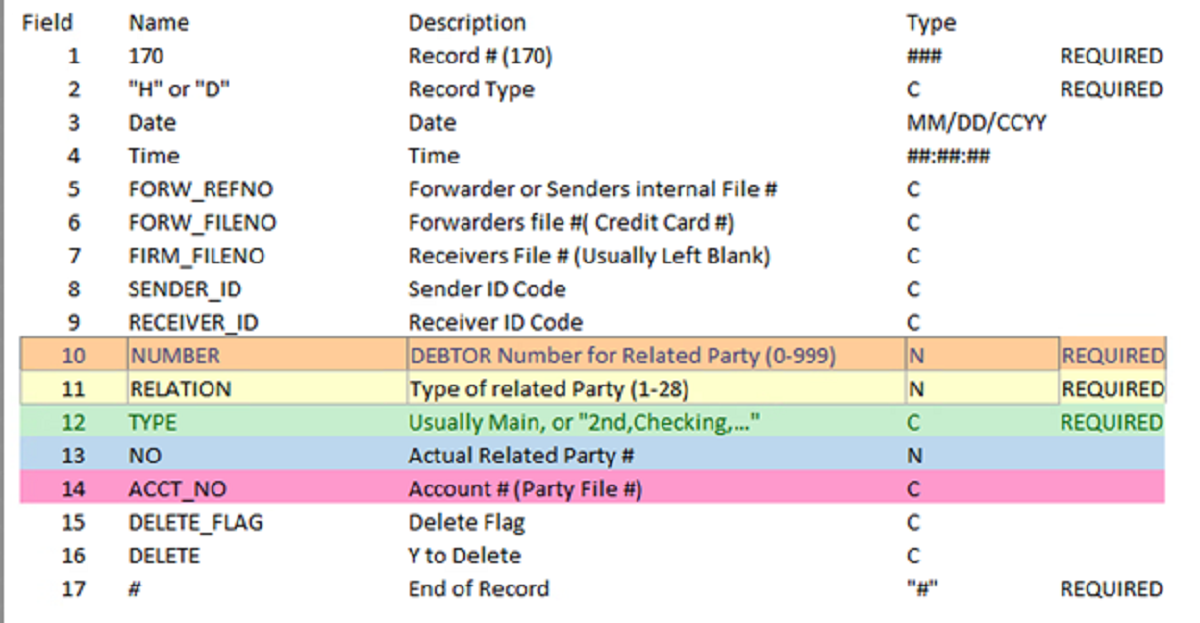
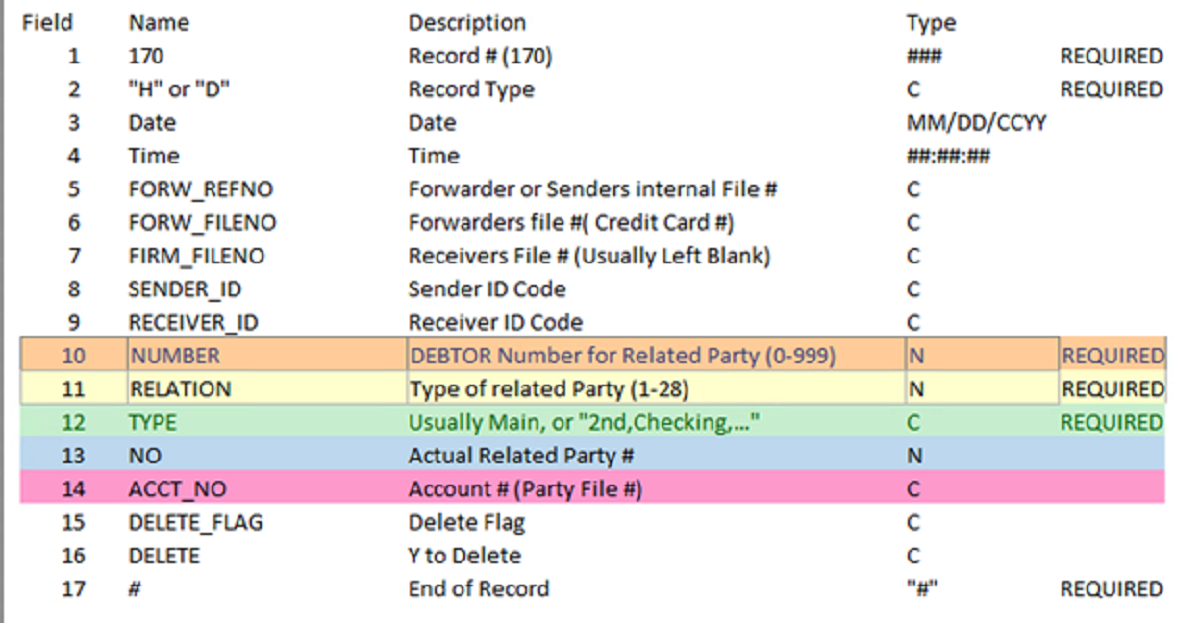
2. Next, look at the chart below from our EDI Manual. It contains information about how the fields above need to be populated.
Click to view larger image
-
For the field “NUMBER,” use the debtor number it is associated with on a claim or otherwise leave as zero. The numbers are useful for things like adversary attorneys or employers, which must be associated with a debtor. Certain parties, such as the forwarder on a claim or the listed co-counsel on a claim, are instead associated with the claim itself rather than a specific debtor. These related party types are instead populated with a 0.
In our particular situation, we want to edit the Forwarder File Number on our claim, so we will need to populate the NUMBER field with 0 and the RELATION field with 1. The below chart shows what each possible value in the RELATION column corresponds to and whether the NUMBER field is typically 0 or the debtor number.
Click to view larger image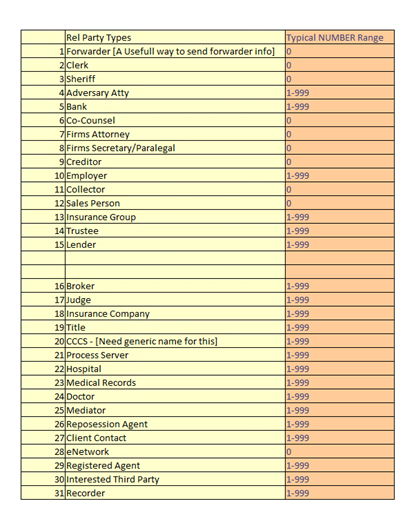
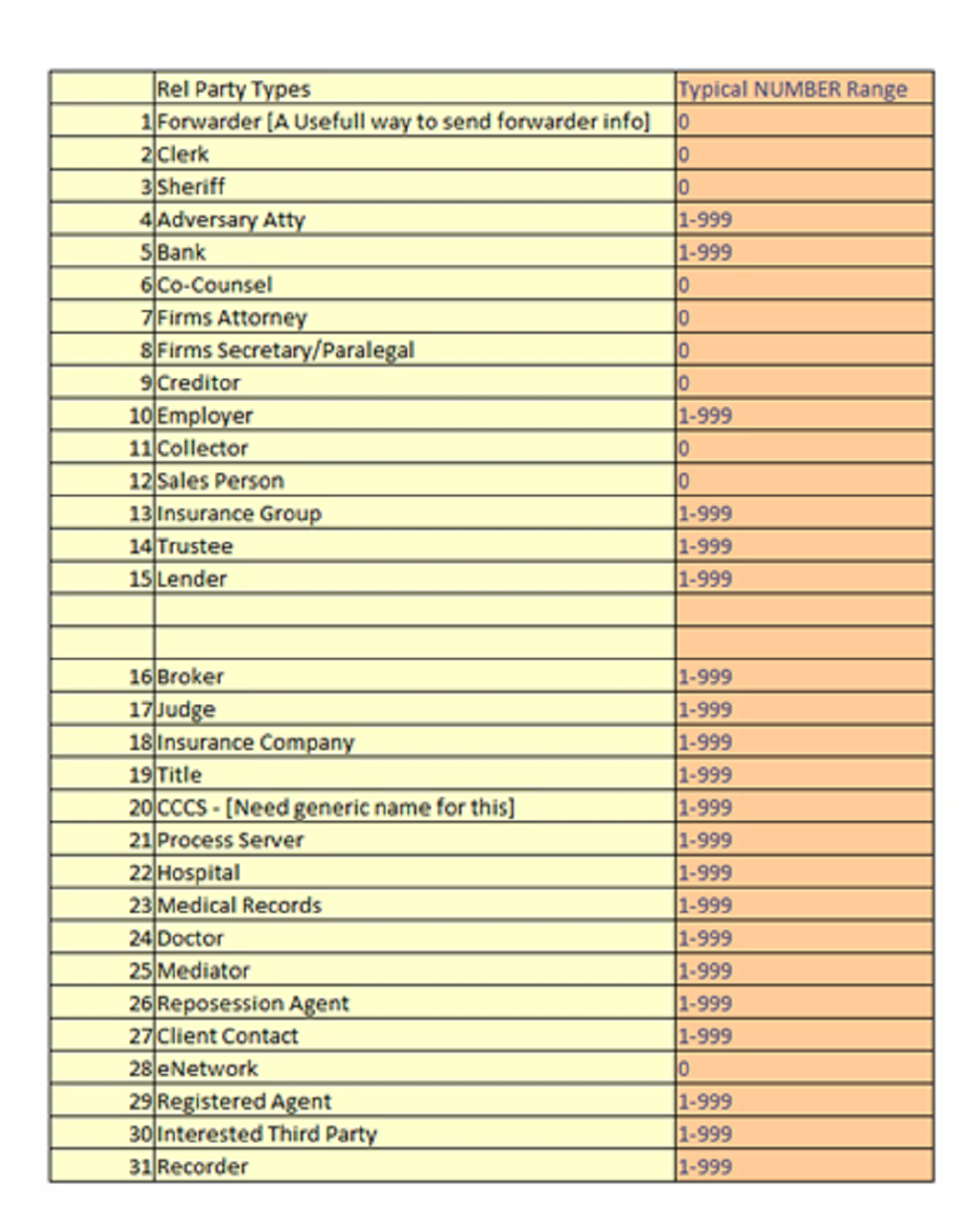
Click to view larger image

-
That only leaves three more fields to populate: TYPE, NO, and ACCT_NO
Click to view larger image
- Type: This field will generally be set to MAIN for most parties. Below is a graph that shows typically what should go in that field
Click to view larger image
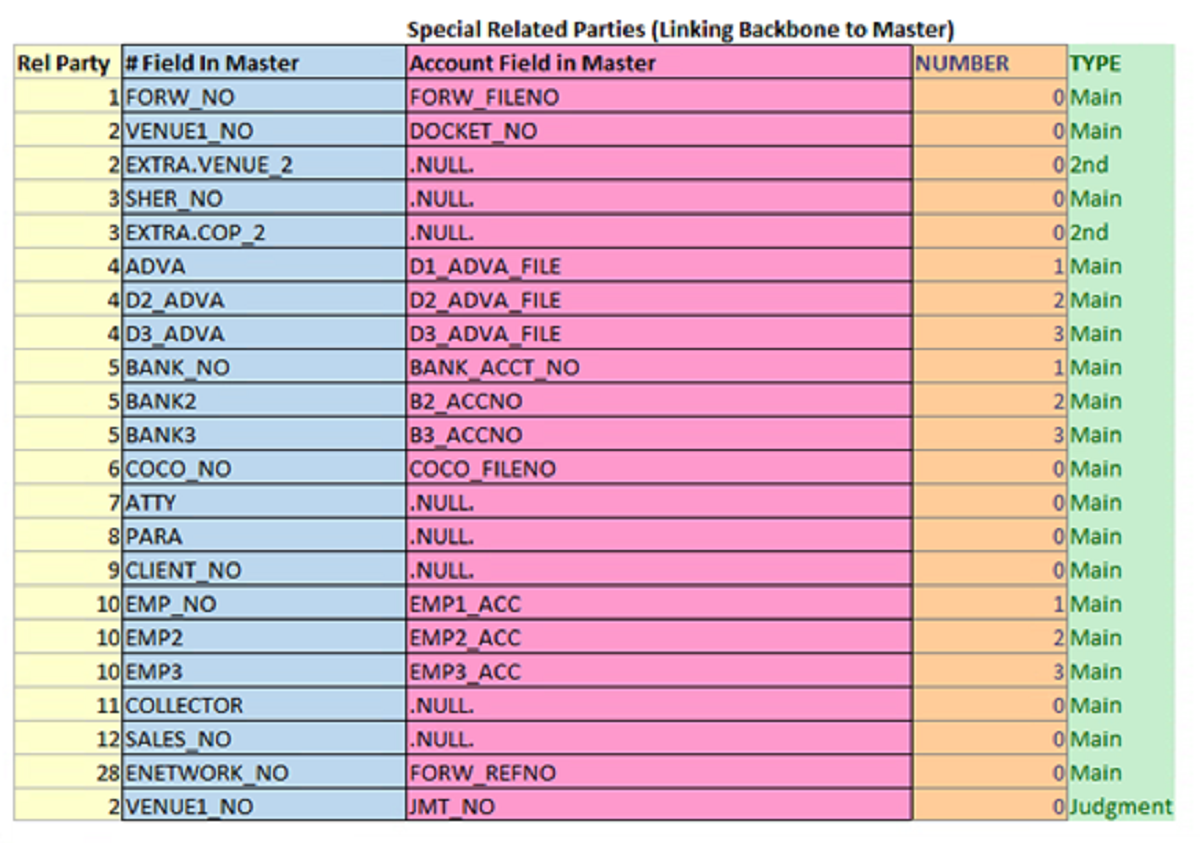
-
NO: This will be the actual party number. In our example, the forwarder number is 5. This field should be populated already.
- ACCT_NO: This field should be the account number of the party in question. In our example, this is where the forwarder file number should be populated. Some types of parties in the internal table have corresponding fields in the MASTER table for the account number. These include venue (Court Docket Number), forwarder number (Forwarder File number), ENETWORK_NO (Forwarder Reference Number) and COCO_NO (Co Counsel File Number).
Click to view larger image

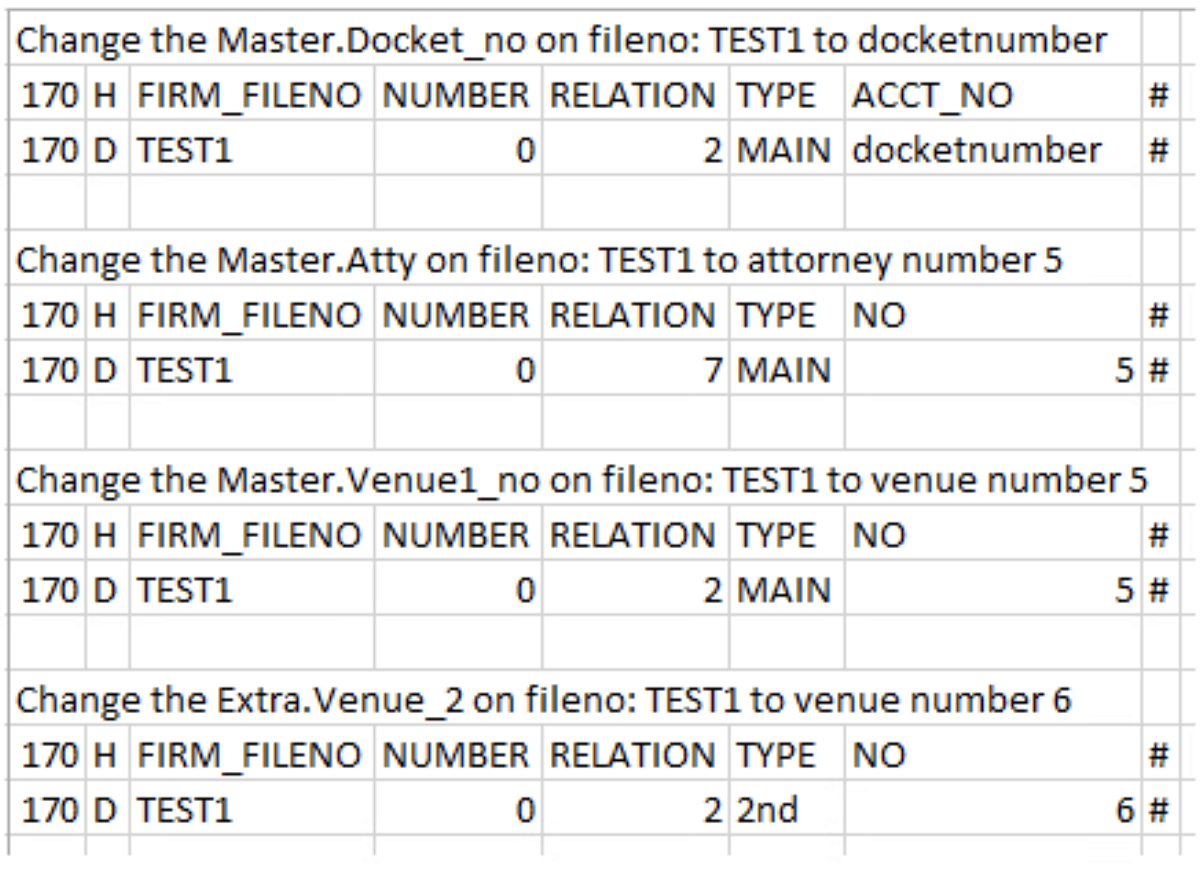
Other Sample CM EDI Record Type 170
Included are also some sample CM EDI Record 170s updating other values in the internal table.
Click to view larger image
 Software Tip
Viewing Data in Change Tracking Tables
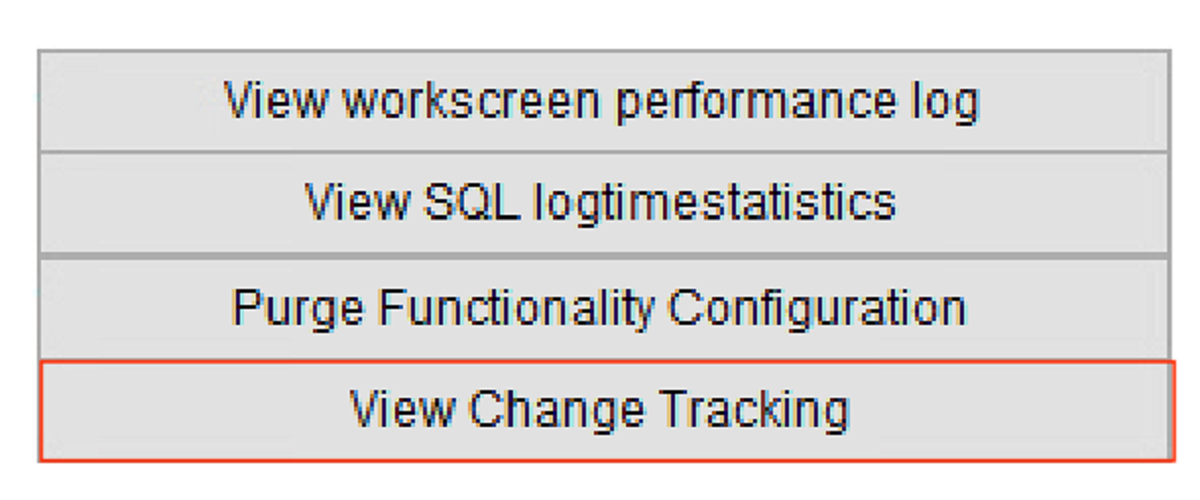
A new button has been added to the Maintenance menu on the System Maintenance-Admin tab, in the Misc section, called [View Change Tracking].
Click to view larger image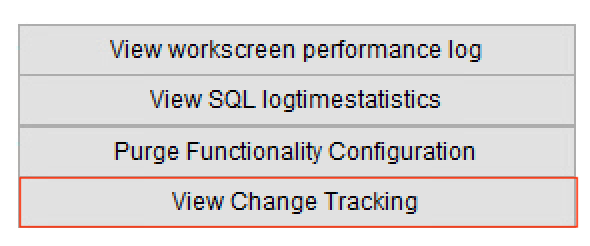
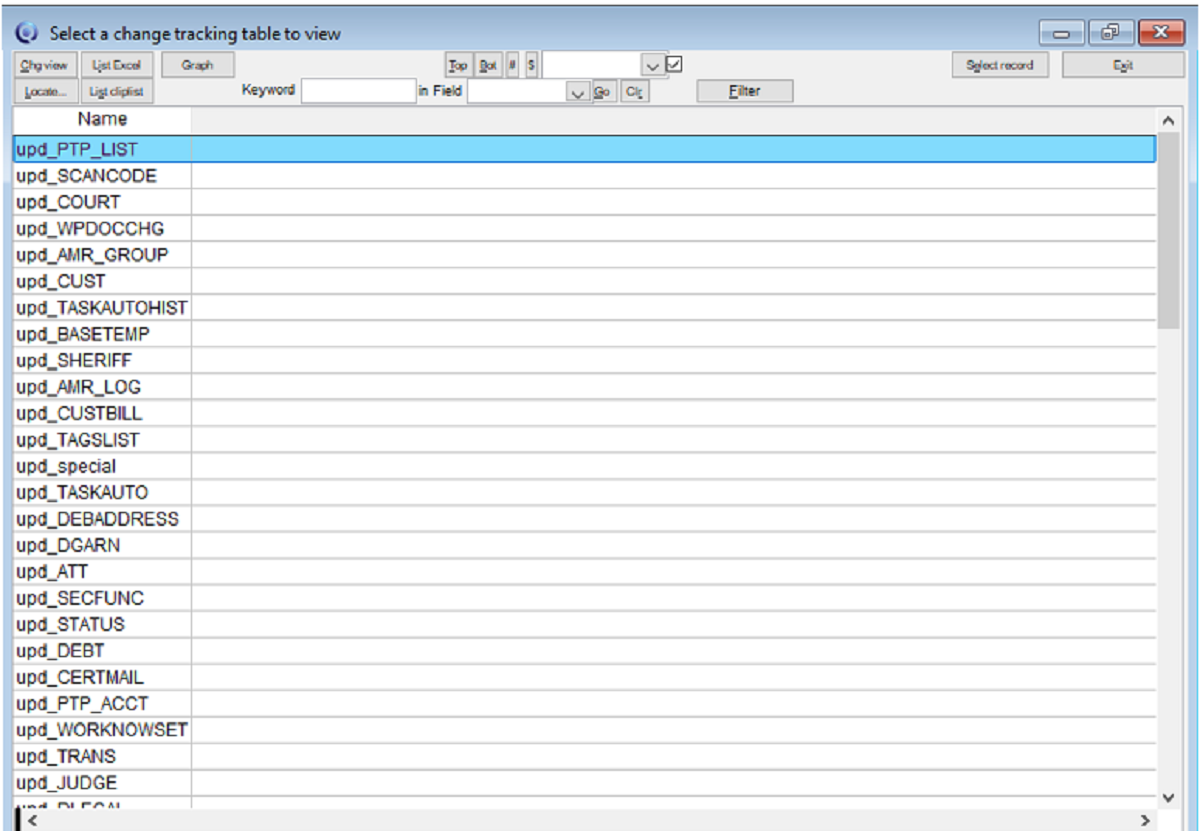
This button will display a list of all change tracking tables where change tracking has been turned on and the corresponding upd_ table created, e.g., upd_debt, upd_scanfile, upd_court, etc.
Click to view larger image
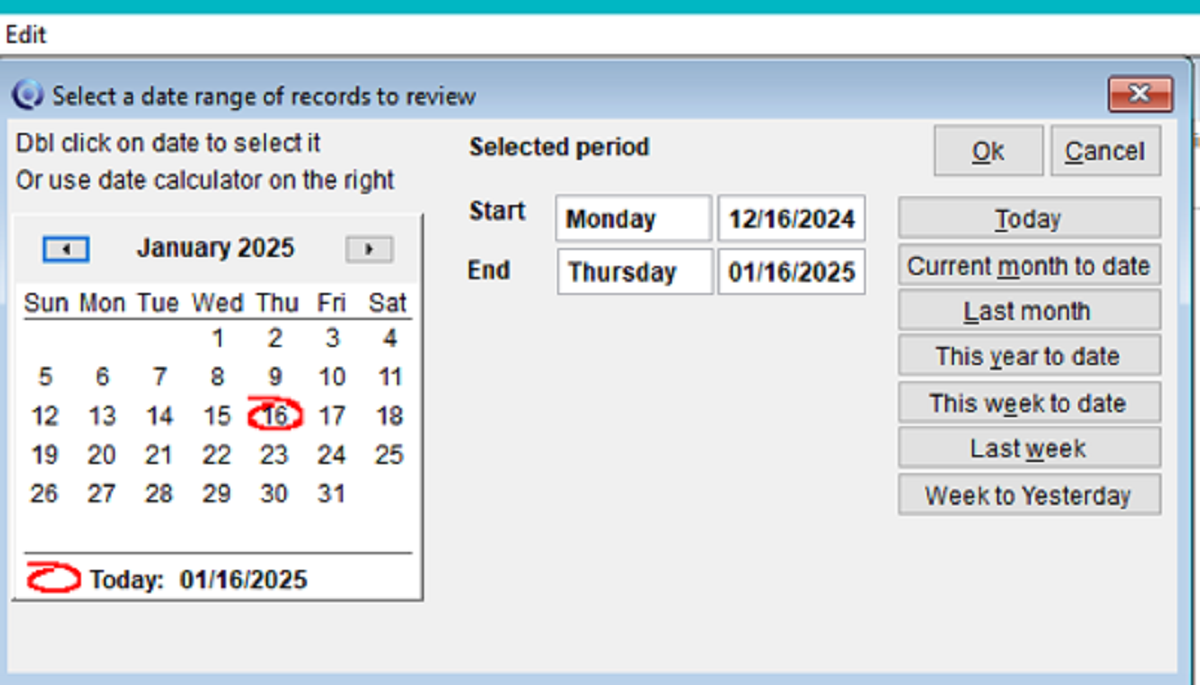
Selecting a table will bring up a calendar so you can define a date range of records to view.
Click to view larger image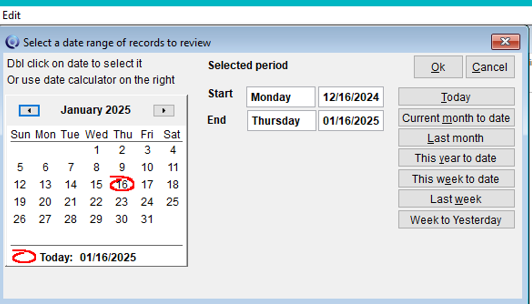
A grid will appear with the data in the table for that date range.
Click to view larger image
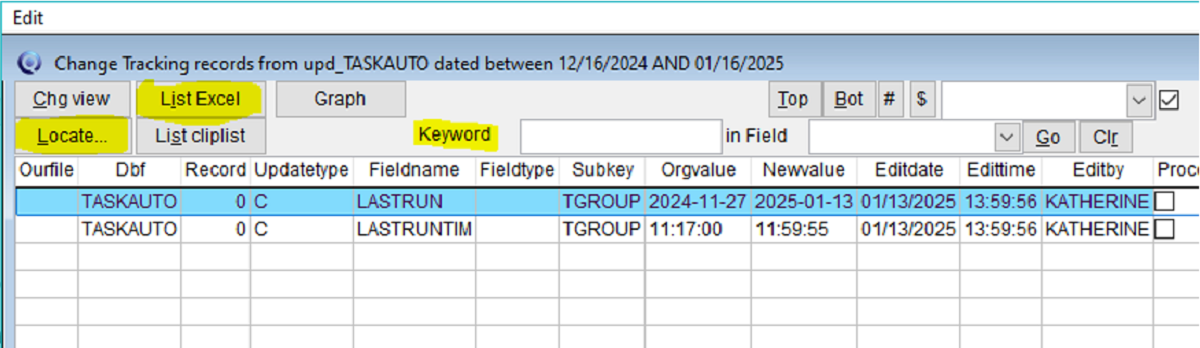
The [Locate] button or keyword search can be used to find records or the information can be exported using the [List Excel] button for sorting outside of Q-LawE. Upon exiting the grid, you will return to the list of tables so you can choose another table. Alternatively, clicking [Exit] from the list will return to the Maintenance menu.
 Software Tip
Print to vMedia Issues: Reinstall Workstation
We’ve created a webpage with step-by-step instructions to help you address Print to vMedia Issues: Reinstall Workstation.
 Software Tip
New Simpler Search
Search Bar on Every Page
Starting in the May Oriole release, you can now search by account number from any page using the fields in the top menu bar. This will save tons of clicks for users who frequently search by account number.
Click to view larger image
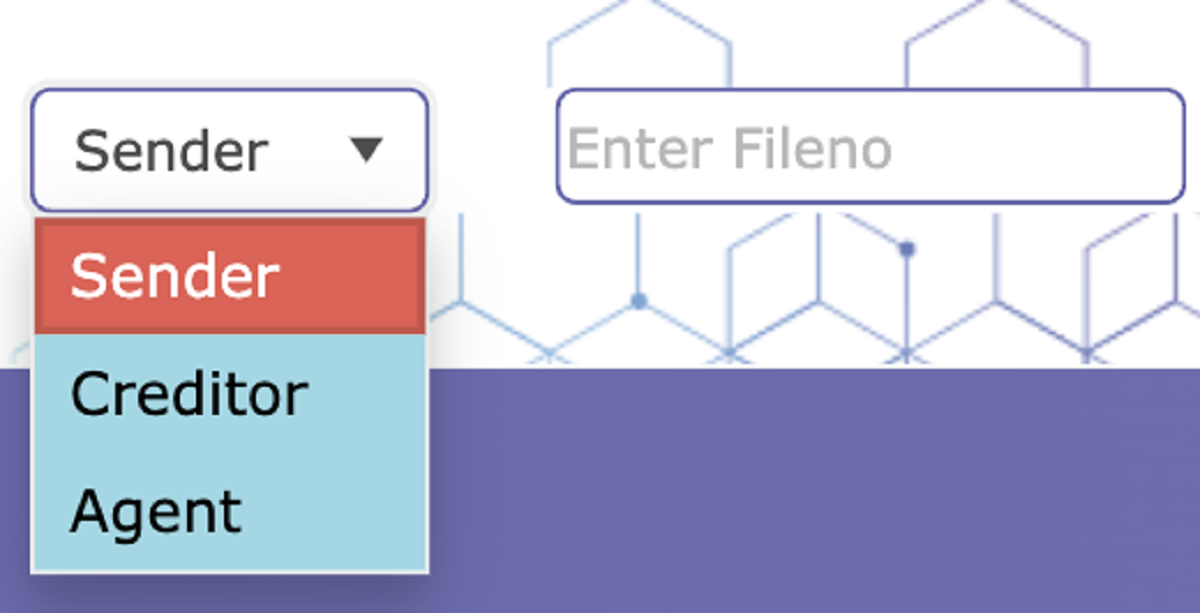
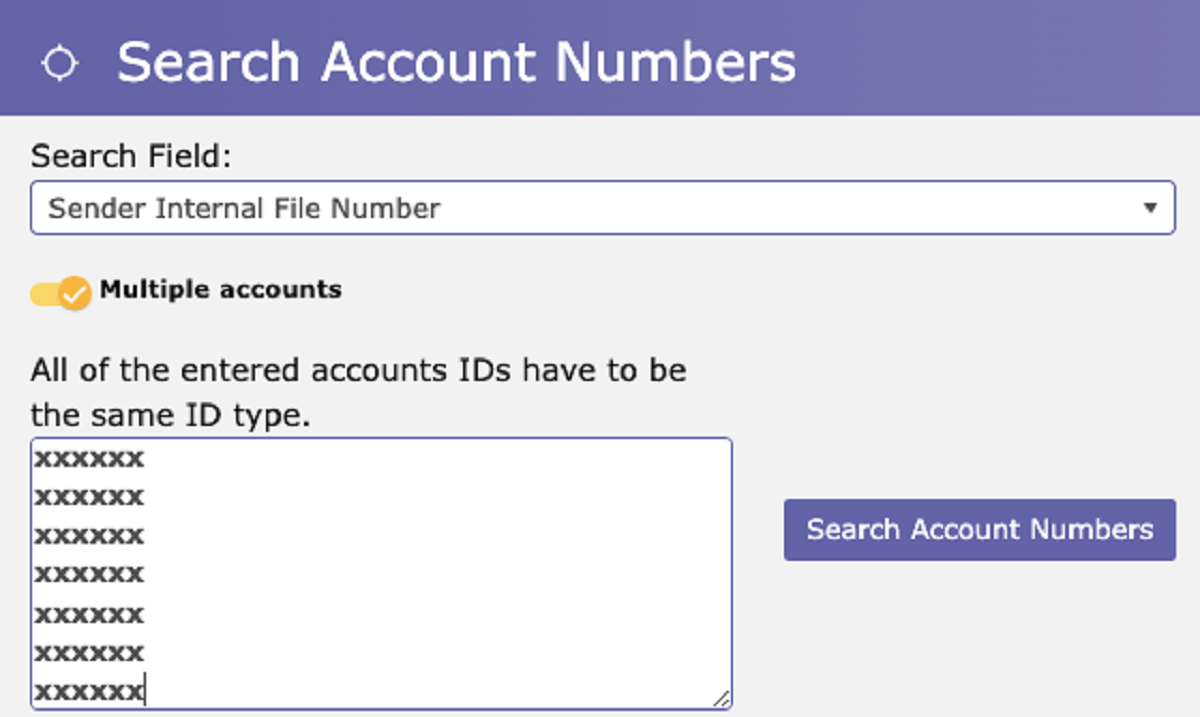
Multi-Account Number Search Just Got Easier
We’ve made it easier to search for up to 3,500 account numbers.
-
You can now copy/paste multiple numbers directly from Excel, Word, HTML and other table tools without manually adding commas.
Click to view larger image
-
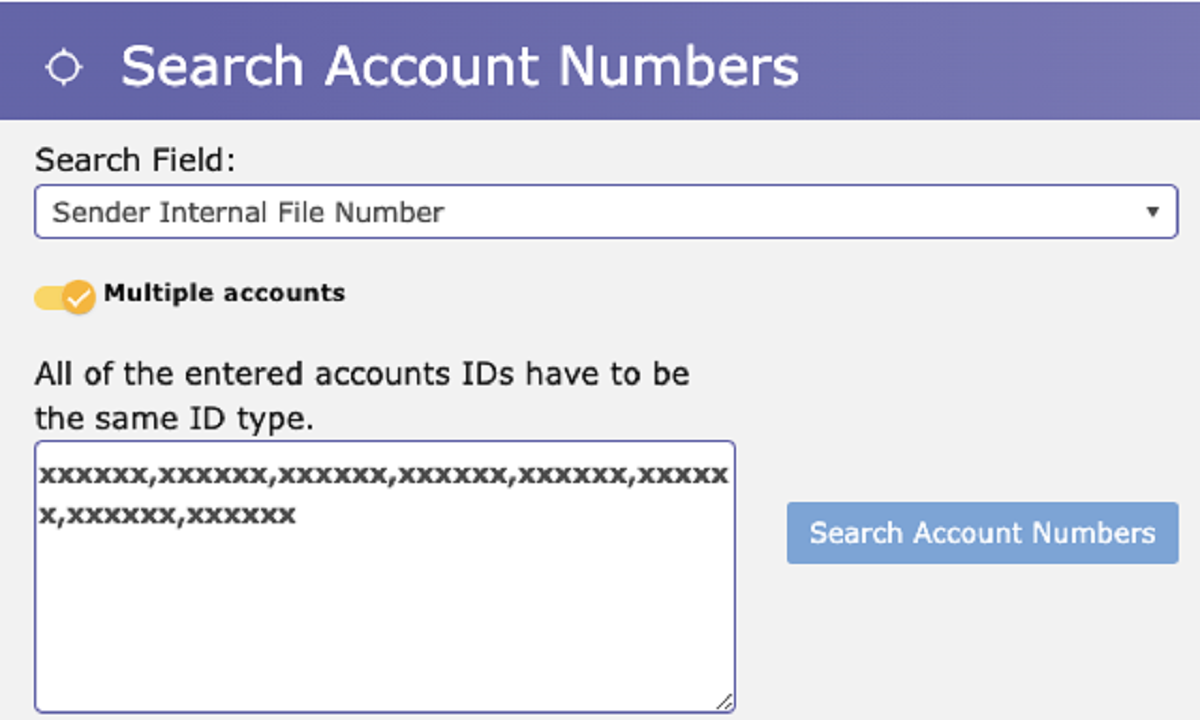
When you click the [Search Account Numbers] button, commas will automatically be added for you.
Click to view larger image
Latest VT Happenings
Quarterly Planning
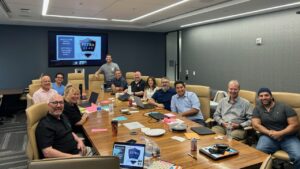 Each quarter, our VT senior leaders gather in New Jersey to participate in a planning session for the upcoming quarter.
These sessions, facilitated by Petra Coach, serve as valuable team building opportunities, strengthening collaboration and camaraderie among our team. No better way to pool our expertise and creativity to fuel innovation, drive the business and industry forward, and ultimately improve people’s lives.
Conferences
 Isaac Goldman, CEO, Nicholas Arcaro, SVP of Business Development, and Maryann McBrinn, vExchange Product Owner, had a great time at the RMAi Executive Summit 2025 Conference in Vermont.
Ongoing collaboration matters to us, and we are committed to supporting you in achieving your business goals.
 Plans are already underway to participate at the upcoming NCBA Connect Annual Conference in October.
So, if we haven’t had the opportunity to connect or if you’d like to continue a conversation, let’s schedule time to meet.

The Mastermind Series, an ongoing program of virtual training sessions presented by Vertican’s top developers and Subject Matter Experts (SMEs), has been well underway! Are you missing out?
Topics are developed to help improve clients’ ability to use our platform features and tools effectively and maximize efficiency. So, take advantage of this exceptional opportunity to learn directly from industry trailblazers and Vertican’s visionary developers.
- SQL-SYNC 2.1A.002 is Here! | Watch here!
Short on time? Mastermind Express videos are quick tutorials right from our Subject Matter Experts. These short-form tutorials are like video software tips.
Do you have a topic in mind for a future tutorial? We want to hear about it. Please send us an email with your suggestion.
- File Level Rejections in vExchange Analytics | Watch the recording here
- vMedia Converting Hanna to Spectrum Importer | Watch the recording here
In Case You Missed It (ICYMI)
📢 When was the last time you updated and/or verified your vPortal account information?
Why? So you receive timely updates, accurate billing, and prompt responses to support requests.
As part of our brand promise of data with integrity, Vertican is dedicated to ensuring successful and accurate delivery of our communications and services. One way we are backing this commitment is that we have added a last verification date field to your vPortal Client Profile. But we need your help.
If you need assistance with updating or verifying your vPortal account:
- Schedule a meeting with Account Management, who will walk you through your account profile and answer any questions.
- Submit a support request through your product’s VSA or on vPortal.
- Use the vPortal Housekeeping Guide
- Instructions to Verify Client Profile are in the Update Client Profile section.
Account verification assistance will not count against your incidents.
Thank you for your prompt attention and helping us help you optimize your account experience.
📢 Did you know Vertican is in the process of upgrading our infrastructure to Windows 11?
We anticipate completing this transition later this year. Once Vertican products are sanctioned for use with Windows 11, technical support will be available.
Click here for more information.
📢 Do you know about Vertican’s Account Management Services and some of the ways they can help you get the most out of your business?
Your Vertican Account Manager is a trusted resource and liaison between your firm and our internal teams to help facilitate support resolutions and submit product enhancement requests. By meeting with Client Success regularly to review support cases, Account Managers are able to serve as an escalation point of contact should you have questions about your case or desire a status update.
📢 Bookmarkable Help Center Links!
Save time searching for those commonly used Help Center pages by bookmarking them! After logging in to vPortal, go to the Bookmarkable Links page, and either bookmark the main page itself or any of the links on that screen!
📢 Keeping your Vertican software up to date is critical to your user experience and especially your business. Are you getting the latest software release notices and other informative communications from our team?
If you are not on our mailing list or have unsubscribed from our email notices, please click here to be in the know and ensure you hear about all the latest software features and relevant industry happenings!
vTrivia Contest
Spring 2025 Winners
Congratulations to the winners!
Kimberly Larson – Midland Credit Management
Alison Mcdonald – Roosen, Varchetti & Oliver PLLC
Lori Borgford – Portfolio Recovery Associates
They were randomly selected for answering the following questions correctly:
1. What new groundbreaking functionality allows you to systematically and securely broker your VT application data encrypted between your systems by leveraging our published API?
C) NextGen.
2. vParser is a powerful tool that.
D) Both B and C
3. vPros offer subject matter expertise and guidance to help firms maximize their software investment through:
D) All of the Above
4. True/False: Account verification assistance will not count against your incidents.
B) True
Winners had the choice of one of these prizes:

Congratulations again to our three winners!
Summer 2025 Contest
Can you answer our vConnect quiz?
Three winners will be chosen at random from everyone correctly answering all four vTrivia questions based on this issue’s various articles. Contest ends September 30, 2025 at 5 p.m. (ET). Good luck!
Summer vTrivia Prizes Up for Grabs

Frozen Drink Maker and Margarita Machine
Enjoy refreshing ice-cold drinks at home with this easy-to-use frozen
drink machine that can create up to 128 ounces of your favorite drink. Includes a carry handle for easy transportation and a removable base for cleaning purposes.

Backyard Golf Cornhole Game
You can keep score, practice chipping, or challenge friends and playing golf games in a cornhole style but with the skills, only a golfer brings to the game.
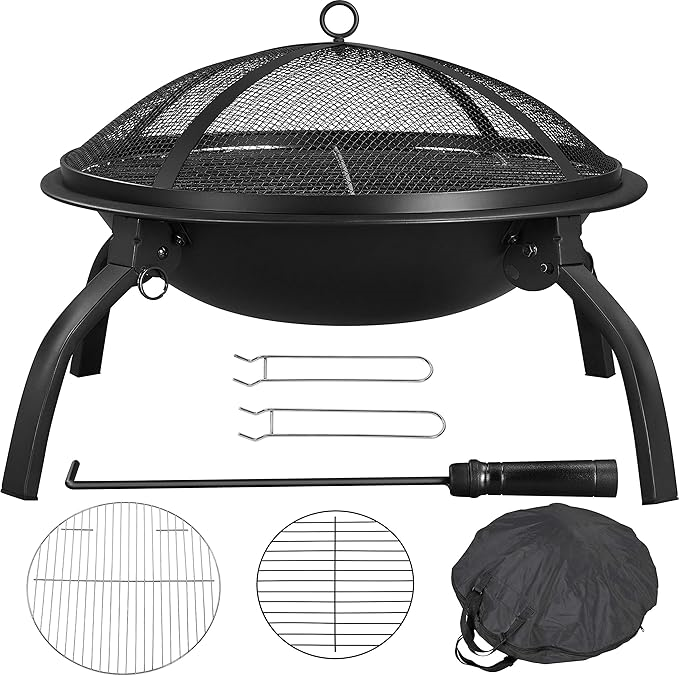
Portable Folding Steel Firepit
This portable, Outside Fireplace with includes a Carrying Bag, Spark Screen, BBQ Grill & Log Grate for Patio Backyard Camping Bonfire.
 vConnect follows a quarterly publication schedule. We’ll see you soon!